How to Unblock Calls on a Panasonic Phone
To unblock calls on a Panasonic phone, open the Call Block list in the menu, find the number and delete it. Panasonic models with a dedicated Call Block button also let you clear an entry with one press.
On this page (9 sections)
- Where is the blocked calls list on a Panasonic phone?
- How to remove a blocked number from the Call Block list
- How to unblock calls on a Panasonic phone without a saved list
- How to unblock calls on a Panasonic phone that has several handsets
- How do you unblock calls when the block came from automated call block?
- How many numbers can you block and unblock?
- How do you keep the block list easy to manage?
- What should you check after you unblock a number?
- When should you unblock a number instead of leaving it blocked?
To unblock calls on a Panasonic phone, open the Call Block list in the menu, find the number and delete the entry, then save. The handset confirms the change and calls from that number ring normally again.
The steps differ slightly by model. Phones with a dedicated Call Block button keep a saved list you can edit.
Basic models screen callers with Caller ID instead, and the unblock step sits in a different menu.
Where is the blocked calls list on a Panasonic phone?
The list lives under the Call Block menu on most Panasonic cordless models. Open the main menu, choose Call Block, then Blocked calls to see every number the phone is screening.
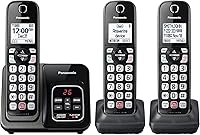
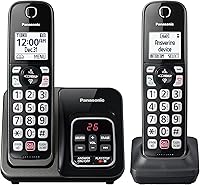
Some models label it "Call Block List" or put it under "Caller ID". The KX-TGD833M and KX-TGF944B both store blocked numbers in this menu and let you scroll the full list on the handset.
The list shows the number and, when Caller ID supplies it, the caller's name. Scroll with the navigation keys or use the up and down arrows until the entry you want appears.
If the list is empty but calls still get screened, the block may be set in the phonebook or in a caller ID screening mode. Check both places before assuming the list is wrong.
How to remove a blocked number from the Call Block list
Select the number and choose erase, then confirm. The handset asks you to save the change, and the entry disappears from the list.
The exact key names vary. On many Panasonic models you press the soft key under "Erase" or "Delete", then confirm with "Yes" or "Save".
Press the off key to leave the menu when you're done.
Here is the typical path on a cordless handset:
- Press the menu button.
- Open Call Block and select Blocked calls.
- Scroll to the number you want to allow.
- Press erase or delete.
- Confirm the change and press off.
The handset confirms when the entry is removed. The next call from that number rings and shows on the display.
Using the one-touch Call Block button
Phones with advanced call blocking have a dedicated Call Block button on the handset. Press it while the blocked calls list is open to remove the highlighted entry without digging through the menu.
The KX-TGD833M adds 1,000 numbers with this button, so the list can get long. Use the navigation keys to jump to the right entry before pressing erase.
Keep the phone within reach while you edit the list. The menu times out after a short pause, and you'll need to start again if the screen returns to standby.
How to unblock calls on a Panasonic phone without a saved list
Turn off the silent ringer mode or clear the screened number. Basic Panasonic models without a saved block list screen callers with Caller ID and a silent ring instead.
Open the menu and look for "Silent mode", "Ringer off" or "Call screening". Switching it off lets the handset ring for every caller again.
If a single number is being screened, find it in the Caller ID log and clear the screening setting for that entry. The menu path follows the same Call Block area on most models.
Our guide to how to block calls on a Panasonic cordless phone covers the reverse steps, so you can set screening up again when a nuisance caller returns.
How to unblock calls on a Panasonic phone that has several handsets
Repeat the removal on every handset in the system. The block list often syncs across handsets, but on some models you clear the entry on the handset where it was saved.
Start with the handset you used to block the number. If the entry is already gone there, check the other handsets in the Call Block menu one by one.
A multi-handset system makes this easier because the menu is identical on each phone. Work through them in the order they sit in the house, so you don't miss the one in the bedroom or the kitchen.
If the number still gets screened after you clear it everywhere, check the phonebook for a saved contact with block switched on. Deleting the contact or turning its block setting off finishes the job.
How do you unblock calls when the block came from automated call block?
Open the blocked calls list and remove the number the automated block added. Automated Call Block pre-screens robocalls before they reach you and records them in the same list.
The KX-TGF944B arrives with 14,000 pre-installed call block numbers, and the automated block adds to that first line of defense. A real caller caught in that net shows up in the blocked calls list.
Find the number in the list and erase it the same way as a manually blocked entry. The caller then rings through on the next attempt.
If a legitimate caller keeps getting caught, add the number to the phonebook. Saved contacts are less likely to be screened by the automated block.
How many numbers can you block and unblock?
The limit depends on the model. The KX-TGD833M blocks 1,000 numbers, the KX-TGF944B blocks 2,000, and the basic KX-TGC222S blocks up to 30.
| Model | Block list size | One-touch button |
|---|---|---|
| KX-TGD833M | 1,000 numbers | Yes |
| KX-TGF944B | 2,000 numbers | Yes |
| KX-TGC222S | 30 numbers | No |
When the list is full, the phone stops adding new numbers. Remove an entry before blocking a new caller.
A long list is easy to manage when the phone has a one-touch button. On a 30-number model, the list stays short enough to scroll quickly.
If you block and unblock often, a model with a bigger list saves time. The 2,000-number model suits a household that gets a steady stream of nuisance calls and needs room to add more.
How do you keep the block list easy to manage?
Clear out old entries and keep real contacts in the phonebook. A tidy list makes it quicker to find and unblock a number when you need to.
Review the list every few months. Numbers that no longer call can come off, which frees space on smaller models.
Save family, doctors and delivery numbers to the phonebook. Saved contacts are easier to spot in a long list and are less likely to be screened.
Our guide to how to block calls on a home phone covers the settings that stop robocalls in the first place. Fewer nuisance calls means a shorter list to edit later.
If you're choosing a new phone for a busy home line, the call blocking landline phone comparison covers the models with the biggest block lists. Our Panasonic cordless phone with answering machine review looks at one model in detail.
What should you check after you unblock a number?
Test it with a call from the unblocked number and watch the display. The call should ring and show the caller's name or number as normal.
If it still doesn't ring, confirm the handset ringer is on and the volume is up. A silent ringer setting catches people out after a menu edit.
Check that the number isn't saved in the phonebook with block switched on. A saved contact can override the block list on some models.
If the caller is a robocall that slipped back through, add the number to the block list again. Automated call blocking catches many of these without you lifting a finger.
Which Panasonic phone makes unblocking easiest?
The KX-TGD833M is the simplest to manage. It has the one-touch Call Block button and a 1,000-number list, so finding and removing an entry takes a few presses.
The KX-TGC222S suits a light user who only blocks the occasional caller. Its 30-number limit keeps the list short and easy to scan.
The KX-TGF944B fits a busy household that needs the 2,000-number limit. The extra handsets mean you clear an entry in one place and it stays cleared elsewhere.
When should you unblock a number instead of leaving it blocked?
Unblock when a real caller is being screened by mistake. Delivery drivers, doctors' offices and family members who call from a new number are the common cases.
Leave a number blocked when it's a robocall or a repeat nuisance caller. If the calls are a one-ring scam, the phone's scam alert shows a confirmation screen before you call back.
If you're unsure, unblock the number for a few days. A real caller will try again.
A scammer rarely does more than once.
If the number stays blocked after the steps above, repeat the removal on each handset. On a system with several phones, one handset can keep the entry alive on its own.
For the full picture on how to unblock calls on a Panasonic phone, start with the Call Block menu and work from the handset you blocked on. Pick the KX-TGD833M for the simplest one-touch list, the KX-TGF944B for a large household, or the KX-TGC222S for light use.
The key step is always the same: find the number in the list, erase it and save.
Frequently asked questions
How do I unblock a number on a Panasonic cordless phone?
Open the menu, go to Call Block and then Blocked calls, then find the number and select erase or delete. Press save or off to store the change.
The handset confirms when the entry is gone, and calls from that number ring normally again.
Why is a number still blocked after I removed it?
The entry may still be stored on another handset in the system, so repeat the removal on each cordless phone. If the number is saved to the phonebook with call block switched on for that contact, delete the contact or turn its block setting off as well.
How many numbers can a Panasonic phone block at once?
The limit depends on the model. The KX-TGD833M lets you add 1,000 numbers with the one-touch Call Block button, and the KX-TGF944B blocks 2,000 numbers.
Basic models such as the KX-TGC222S block up to 30 nuisance callers.
The full list lives in the menu.
Does unblocking a number delete it from my phonebook?
No. The blocked calls list and the phonebook are separate.
Removing a number from the block list only allows its calls through.
The saved contact stays in the phonebook with its name and ringtone, so you can still dial the person.
What happens after I unblock a number on a Panasonic phone?
Calls from that number ring again and show on the Caller ID display like any other call. The phone stops screening or silencing it.
If the caller is a robocall, add the number back to the block list rather than deleting it.