Panasonic Cordless Phone with Answering Machine Review: Worth It? (November 2026)
The Panasonic KX-TGD833M cordless phone with answering machine suits homes that need phones in 3 rooms and several ways to screen unwanted calls. Choose the KX-TGD832M for 2 handset locations or the KX-TGD864W to add cellphone pairing.
On this page (9 sections)
- The Panasonic cordless phone with answering machine at a glance
- How does its call blocking work?
- What does the answering machine offer?
- How many handset locations do you actually need?
- Which alternative fits your home better?
- How should you set up the phone and answering system?
- What should you check for an older family member?
- Which care habits and mistakes matter most?
- Which Panasonic cordless phone with answering machine should you buy?
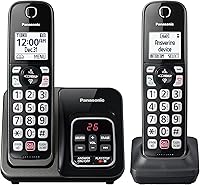
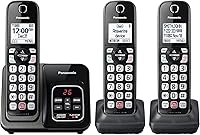
The Panasonic KX-TGD833M cordless phone with answering machine is a good choice for a home that needs phones in 3 rooms and several ways to screen unwanted calls. Its main advantage is the mix of room coverage, message access and call-blocking controls.
Choose it for a kitchen, bedroom and living room setup, for example. If you only need 2 phone locations or want to answer cellphone calls through home handsets, one of the alternatives below fits better.
The Panasonic cordless phone with answering machine at a glance
The KX-TGD833M suits households that use a home phone daily and want messages within reach from more than one room. It connects to traditional landline networks and supports expansion to 6 handsets.
Panasonic 3-handset cordless phone with advanced call block: Best for busy family homes

- 3 handsets included
- Automated and telemarketing call blocking
- Blocks up to 1,000 additional numbers
- 17-minute digital answering system
Choose this set for phones in 3 rooms, message playback from a handset and several call-blocking controls. It also offers conversation recording and a confirmation screen before returning a one-ring call.
Pros
- Automated and telemarketing call blocking
- One-touch blocking for 1,000 additional numbers
- Message playback from base or handset
- Illuminated keypad with large characters
Cons
- Finite message storage needs regular clearing
- No Link2Cell feature among its included functions
The digital answering system holds up to 17 minutes of messages, with a Quick-Read Message Counter and playback from the base or a handset. That makes it practical to check a missed call from the room you're already in.
Its call-management tools include automated blocking, telemarketing blocking and a button for blocking individual numbers. Two-way conversation recording and a one-ring scam alert add separate ways to handle suspicious or important calls.
Who should choose this Panasonic cordless phone with answering machine?
Buy the KX-TGD833M if 3 useful phone locations would save you from carrying a handset between rooms. Its illuminated keypad, large characters and speed dial also suit someone who wants familiar dialing controls close at hand.
Skip it if you need cellphone pairing, separate lines for different people or much more message storage. Multiple handsets share the phone system; they don't turn this single-line set into several independent phone lines.
How does its call blocking work?
The KX-TGD833M offers several blocking controls for different situations. Panasonic says Automated Call Block pre-blocks robocalls, while Telemarketing Call Block lets you block announced callers.
The one-touch Call Block Button handles up to 1,000 additional numbers. Use it for an unwanted number that gets through, rather than expecting the automated feature to make every decision for you.
The one-ring scam alert displays a confirmation screen when you return a one-ring call. Treat that screen as a prompt to reconsider the callback, not as proof that the number is safe.
A short ring alone is not a reason to call an unknown number back. If the call appears to concern an account or appointment, contact the organization through a number you already trust.
Start with settings you understand and check that wanted callers can reach you. Be especially careful when you expect calls from a clinic, delivery service or another organization whose outgoing number may be unfamiliar.
The Panasonic call-blocking guide explains the controls in more detail. Keep the model's instructions nearby during setup, since button sequences can differ between systems.
What does the answering machine offer?
The answering machine is best for regularly checked household messages. Playback from a handset is useful if the base sits in a hallway or another room you don't spend much time in.
Think in minutes rather than message counts. A few long messages can use more space than many brief requests to call back.
Delete old messages after you've saved any details you need. Before a trip, clear space and check that the answering system is on, especially if you usually answer most calls yourself.
The phone's two-way recording serves a different purpose from missed-call messages. It lets you replay a conversation and includes a “Start Recording” announcement, so don't plan around silent recording.
If your provider also offers voicemail, choose which service should usually answer first. Their ring settings can determine whether callers reach the Panasonic machine or the provider's mailbox.
For other message-handling options, see our cordless phones with answering machines. The answering machines category guide is another useful place to compare systems.
How many handset locations do you actually need?
Choose the handset count by where you answer calls, rather than by the number of people at home. One person may need phones on 2 floors, while several people in a compact home may share fewer locations.
Place one handset near where you spend the day and another near where you sleep. A third makes sense for a separate office, another floor or a room that's far from those spots.
Each charging location needs access to power. Check outlet positions before deciding where the phones will live, and keep charging cords out of walkways.
The main base needs the phone-line connection. Additional handset chargers give you more places to keep phones without needing a separate telephone jack at each charger.
Buy more included handsets when you already know where they'll go. If your needs are uncertain, start smaller and confirm the exact compatible handset model before expanding.
Our guide to how many cordless handsets you need helps you plan locations. Remember that handset count affects convenience, not the number of separate outside lines.
Which alternative fits your home better?
The alternatives suit different room layouts and calling habits. The smaller set keeps the core message and blocking functions, while the other models add household communication tools or cellphone pairing.
KX-TGD832M: choose it for 2 regular phone locations
Panasonic 2-handset cordless phone with answering machine: Best for smaller households

- 2 handsets included
- Digital answering system
- Automated and telemarketing call blocking
- Up to 1,000 additional blocked numbers
A good fit for homes that need a phone in 2 places without giving up the main model's core blocking and message features. Compatible extra handsets can extend the system later.
Pros
- Automated and telemarketing call blocking
- Message playback from base or handset
- Expandable up to 6 handsets
- Backlit keys with large characters
Cons
- Extra handsets needed for more than 2 locations
- Not a substitute for a multi-line office system
The KX-TGD832M makes sense for a bedroom and living room, a small apartment or a home office plus a shared room. You get the same core automated and telemarketing blocking approach as the main pick without needing a third charging spot.
Its answering system stores up to 17 minutes of messages, with playback from the base or a handset. It also includes conversation recording and a one-ring scam alert, so choosing fewer handsets doesn't mean giving up those functions.
Buy it if 2 locations cover your routine and you want room to grow later. The system supports up to 6 handsets, but any additions should be checked for compatibility.
Skip it if you already know you need a phone on each of 3 floors. Starting with the right handset count saves you from arranging an extra handset purchase and registration straight away.
KX-TGE633M: choose it for communication between rooms
Panasonic 3-handset expandable cordless phone with call blocking: Best for shared households

- 3 handsets included
- 17-minute digital answering system
- Automated call blocking with access code
- English and Spanish talking Caller ID
This set suits households that want intercom use, a full-duplex speakerphone and English or Spanish caller announcements. Its automated blocking asks callers for an access code.
Pros
- English and Spanish talking Caller ID
- Full-duplex speakerphone and home intercom
- 1.8 in full dot handset display
- Side volume key and visual ringer
Cons
- Talking Caller ID requires additional phone service
- Access-code screening adds a step for callers
The KX-TGE633M suits a household that wants more ways to use the handsets between outside calls. Its home intercom and full-duplex speakerphone are useful reasons to choose it over a set selected only for message storage.
The side volume key and visual ringer give users different ways to manage or notice calls. Its 1.8-inch full dot display and illuminated keypad are also worth weighing if clear controls matter more than cellphone features.
Automated blocking prompts callers for an access code. That extra step suits someone who wants caller screening, but it may be a poor fit if frequent wanted callers would struggle with a prompt.
English and Spanish talking Caller ID requires additional phone service. Skip this model if you don't want access-code screening, and confirm your service supports caller announcements before making them a deciding feature.
KX-TGD864W: choose it to answer mobile calls around home
Panasonic 4-handset cordless phone with answering machine: Best for cellphone households

- 4 handsets included
- Link2Cell Bluetooth for up to 2 cell phones
- Advanced call blocking
- 18-minute digital recording capacity
Choose this set to make and receive mobile calls through cordless handsets around the home. Link2Cell pairs with up to 2 cell phones, while the included handsets cover 4 locations.
Pros
- Four handsets included
- Pairs with up to 2 cell phones
- Advanced blocking and conversation recording
- One-ring scam alert
Cons
- Cellphone pairing adds a setup step
- 1.6 in monochrome display may feel small
The KX-TGD864W is the option here for Link2Cell Bluetooth, which pairs with up to 2 cell phones. Its 4 included handsets suit a home where people want mobile calls within reach in several rooms.
You can leave a paired cellphone where its reception is better and make or receive mobile calls through a cordless handset. This helps with handset placement around the home, but it doesn't create a cellular signal where none exists.
Choose it if you routinely miss mobile calls because your cell phone is charging elsewhere. It also makes sense when 2 people want access to paired phones through the home system.
Skip it if you only need a straightforward landline setup or have no use for 4 handset locations. Its 18-minute digital recording capacity is only a small increase over the other sets, so cellphone pairing should drive the choice.
A guide to cordless phones that link to a cell phone can help you compare Link2Cell systems.
How should you set up the phone and answering system?
Set up calling and message handling first, then add blocking rules and saved numbers. This makes it easier to spot a connection problem before several settings change at once.
- Confirm the connection. The KX-TGD833M uses a traditional landline connection, so check your service before ordering if you're unsure what your home has.
- Choose the base location. Put it near the phone connection and a power outlet, with space to reach the message controls.
- Charge the handsets. Fit the included rechargeable batteries as directed and follow the manual's initial charging instructions.
- Place a call in both directions. Call out, then call the home number from another phone and confirm the expected handsets ring.
- Set the answering controls. Record a clear greeting, check the ring settings and leave a sample message.
- Add blocking and speed dial. Save essential numbers and learn how to reverse an accidental block.
If you use provider voicemail, check which system receives the sample message. Adjust the answering order to suit how you want to retrieve missed calls.
For the physical connection steps, follow our guide to connecting a cordless phone to a phone jack. Avoid changing several settings at once if the first call doesn't connect.
What should you check for an older family member?
Choose by the person's ability to read, hear and use the controls. Large characters and illuminated keys help with dialing, but they don't answer every access need.
Check whether the person can read the display where the phone will sit. Keypad size, screen contrast and the ease of reaching volume controls can matter more than the total number of features.
Keep the first setup simple. Save the numbers they call most, show them how to play messages and explain the block button before enabling unfamiliar screening options.
Don't assume that one family member's preferred settings will suit everyone. Our guide to choosing a cordless phone for a parent explains the practical checks to make.
Which care habits and mistakes matter most?
Keep the phone charged, clean and ready to take messages. Most routine care is simple, but forgotten messages and misplaced handsets can undo the convenience of a multi-handset set.
Wipe the handset and base with a soft cloth, following the manual's cleaning guidance. Keep liquids away from charging contacts, buttons and connection points.
Use the rechargeable battery type specified for the exact handset when replacement becomes necessary. Don't substitute ordinary disposable batteries in a charging handset.
If a handset stops charging well, check that it sits properly in its cradle and inspect the contacts before assuming the whole system needs replacing. Keep the base and chargers where they won't be knocked or splashed.
Avoid these buying and setup mistakes:
- Confusing voicemail with the answering machine. They can receive calls at different points and need separate settings.
- Buying by handset count alone. A spare phone is useful only if it has a practical location.
- Assuming blocking identifies trustworthy callers. An unblocked call can still be suspicious.
- Ignoring message storage. Clear unneeded messages before the available space runs low.
- Expecting automatic power-cut service. Charged handsets alone don't mean the base or your phone service will work without electricity.
Which Panasonic cordless phone with answering machine should you buy?
Choose the KX-TGD833M when 3 phone locations match your home and you want direct access to both messages and blocking controls. Before ordering, confirm the service connection and decide where each handset will charge.
Choose the KX-TGD832M if 2 locations cover your day. Pick the KX-TGE633M for its intercom, speakerphone and access-code screening, or the KX-TGD864W when cellphone pairing is central to how you answer calls.
If none fits, use our best Panasonic cordless phones guide to widen the search. For nuisance calls as the main concern, compare the best call-blocking cordless phones and the features in our call-blocking guide.
Frequently asked questions
What is the model number of this Panasonic cordless phone with answering machine?
The main model in this review is the Panasonic KX-TGD833M. It includes 3 handsets, a digital answering system and several call-blocking tools.
Choose it when you need phones in 3 rooms from the start; the system can expand to 6 handsets with compatible additions.
How many messages can the KX-TGD833M answering system store?
The KX-TGD833M holds up to 17 minutes of messages, so there is no fixed message count. Short messages leave room for more callers than long ones.
You can check the message counter and listen from the base or a handset, then delete messages you no longer need.
How many numbers can the Panasonic KX-TGD833M block?
The one-touch Call Block Button handles up to 1,000 additional numbers. The KX-TGD833M also has Automated Call Block and Telemarketing Call Block for other forms of screening.
Blocking a number does not verify other callers, so keep treating unexpected requests for money, passwords or account details with care.
Can you block calls on a Panasonic cordless phone?
Yes, the KX-TGD833M combines automated and telemarketing blocking with a one-touch button for unwanted numbers. Set up the controls for your model, then make sure wanted callers can still reach you.
Our guide to blocking calls on a Panasonic cordless phone explains the process in more detail.