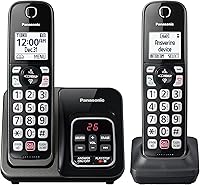
What to Look for in a Cordless Phone for a Parent
The right cordless phone for seniors matches the person's sight, hearing and daily routine. Choose Panasonic for favorite-contact shortcuts and call amplification, VTech VG232-3 for handset message playback, or VG231-3 when built-in messages and blocking aren't needed.
On this page (8 sections)
- What makes a cordless phone easy to use?
- Which sound controls should you check?
- How many handsets should you put around the home?
- Does your parent need an answering machine or call blocking?
- What should you check before setting up the phone?
- How do you keep the phone ready for daily use?
- Which common buying mistakes should you avoid?
- Which cordless phone for seniors should you choose?
A cordless phone for seniors should make answering, dialing and hearing calls easier in the rooms where it will be used. Start with your parent's daily tasks, then choose the handset count and extra features that support them.
For these 4 options, Panasonic suits people who want favorite-contact shortcuts and call amplification. The VTech VG232-3 suits households that want messages available from several rooms, while the VG231-3 suits those who already have voicemail or don't need a recorder.
Ask your parent which part of the current phone causes trouble: reading numbers, pressing keys, hearing speech, reaching a handset or retrieving messages. That answer gives you a useful starting point.
For a wider range of choices, compare our cordless landline phones for seniors guide.
What makes a cordless phone easy to use?
An easy-to-use phone has clear controls for the tasks your parent does most. Large keys help, but the answer button, end-call button and volume controls deserve just as much attention.
Look at the handset from a normal seated position. A screen that reads well under bright overhead light may be harder to read beside a chair or bed.
Check whether your parent can hold the phone and reach its controls without shifting their grip. Someone who finds small movements difficult may prefer speakerphone for longer conversations, provided its controls are easy to use.
Include charging in the decision. A phone that is easy to dial but awkward to place back on its charger can lead to missed calls when the battery runs down.
How do you choose a cordless phone for seniors with big buttons?
Choose separate, clearly labeled keys your parent can press without catching the next button. Backlighting helps in dim rooms, while spacing helps the fingers find the intended number.
The VTech VG232-3 is a useful choice for a parent who wants the same controls in 3 regular calling spots. Its handsets come pre-registered, so initial setup does not require pairing each one to the base.
Choose it when message access and room-to-room use matter together. It includes an intercom, call transfer and a full-duplex speakerphone, which allows both people to speak at the same time.
Skip it if the main need is a dedicated favorite-contact shortcut or amplified calls. The Panasonic options address those needs more directly, while a smaller home may only need 2 handsets.
For that smaller setup, the Panasonic 2-handset cordless phone with large display is worth considering.
Is a large display or talking caller ID more useful?
A readable display helps with checking numbers and phone status; talking caller ID helps when looking at the screen is difficult. Neither replaces clearly labeled controls for answering and ending calls.
The VTech VG231-3 suits a parent who wants phones in several rooms without managing a built-in answering machine. It has no call blocking, so choose it when those functions are already handled elsewhere or aren't wanted.
Its intercom lets someone call another handset within the home. That can be useful when two people spend time on different floors and don't want to shout between rooms.
Skip this model if nuisance-call controls or local message recording are priorities. Choose the VG232-3 for a built-in recorder, or consider Panasonic when call blocking is central to the decision.
Caller ID services can depend on your phone provider and plan. Confirm that service before choosing a phone mainly for its incoming-caller display or announcements.
Which sound controls should you check?
Check conversation volume and the ringer separately, because hearing a call and noticing an incoming call are different needs. A louder earpiece won't help if your parent misses the ring from the next room.
The Panasonic KX-TGU432B and KX-TGU433B provide Volume Boost up to +12 dB. Both also have talking caller ID, making them useful choices when hearing caller information is easier than reading it.
Choose the Panasonic KX-TGU433B when your parent needs these controls in 3 rooms. It combines that access with a 2.1-inch display and big buttons, so sound support doesn't come at the expense of readable dialing controls.
Skip the third handset if there isn't a clear place for it. The 2-handset Panasonic offers the same core calling aids with fewer charging spots to manage.
Set conversation volume during an ordinary call, starting low and increasing it to a comfortable level. Extra loudness isn't always the same as clearer speech, particularly if the caller speaks quickly or background noise is high.
Both VTech models have hearing-aid compatibility. If your parent uses hearing aids, check the phone and hearing-aid instructions for the right calling position or mode; compatibility alone doesn't select those settings.
For speakerphone use, choose a quiet spot and put the handset on a stable surface. Moving closer to the microphone can help more than raising the speaker volume across a noisy room.
How many handsets should you put around the home?
Choose charging locations first, then handset count. The aim is to keep a phone near your parent without placing chargers in rooms they rarely use.
Two handsets often make sense for a main living area and bedroom. Three can cover another floor, a separate sitting room or a kitchen where your parent spends much of the day.
The Panasonic KX-TGU432B suits a smaller home or someone who wants a phone beside the bed and another near a favorite chair. Its flashing Favorites Key signals incoming and missed calls and holds up to 3 contacts for quick calling.
Both Panasonic options include a handset flashlight. Treat that as a convenience for nearby light, while keeping normal room lighting and a separate flashlight easy to reach.
Skip the 2-handset set if it would leave your parent carrying a phone up and down stairs every day. Both Panasonic systems support expansion to 6 handsets, with additional handsets sold separately, but buying the right starting set reduces later setup.
Use our cordless phone with 4 handsets guide to plan a larger layout. Remember that an extra charger needs power, even though it doesn't need its own phone jack.
More handsets improve access, but they don't create extra phone lines. These are single-line systems, so plan around one outside conversation rather than separate calls for each room.
Does your parent need an answering machine or call blocking?
Choose an answering machine for easy access to missed messages, and call blocking for unwanted calls. Decide on each function separately instead of assuming every home needs both.
The VTech VG232-3 has a 14-minute answering machine with playback from any handset. It also allows live call screening and remote message access, making it the stronger VTech choice here for a parent who regularly checks messages.
Both Panasonic options have digital answering systems with 17 minutes of recording capacity. Recording time is shared storage, so make deleting old messages part of the routine rather than choosing by capacity alone.
If your parent already uses provider voicemail comfortably, a second recorder can create confusion. Decide which will answer first, then adjust the ring settings using the phone and provider instructions.
The Panasonic models combine automated robocall blocking, telemarketing call blocking and a dedicated button that can block up to 1,000 numbers. These suit a parent who wants unwanted-call controls on the phone itself.
During setup, explain how to block a number and how to correct a mistake. Follow the manual's steps for allowing important callers through any screening settings.
Call blocking doesn't prove that an allowed caller is trustworthy. A familiar-looking name or number should never be the only reason to share personal information.
For more choices, see our call-blocking cordless phones guide. If message playback is the main need, compare cordless phones with answering machines.
What should you check before setting up the phone?
Confirm working phone service, nearby power and reachable charging spots before unpacking the system. A cordless phone still needs a base connected to the phone service; it doesn't create service on its own.
For traditional landline service, the base connects to a phone jack. With cable or internet-based phone service, it may connect to the telephone port on a provider's modem or phone adapter.
The VTech VG231-3 explicitly supports landline, cable and VoIP services. For any model, confirm the connection with your provider rather than assuming a handset connects directly to Wi-Fi.
Our guide to connecting a cordless phone to a phone jack explains the basic connection. Keep telephone cords and power cables out of walking paths.
Place the base in an open location rather than inside a cabinet. Walls, floors and building materials affect cordless coverage, so make a call from every intended handset location before settling on the layout.
Follow the manual's first-charge instructions before relying on the handsets. Check that each one shows it is charging when placed in its cradle.
Then set the date, time, ring volume and message greeting. Add frequent contacts with your parent's agreement, and check the saved numbers before using any shortcut.
Let your parent complete a short practice routine: answer a call, change the volume, end the call and return the handset. Show one extra function at a time, starting with the one they expect to use most.
Leave a short, large-print note beside the main charger if it helps. Use the exact button names for a few daily tasks instead of copying pages of menu instructions.
How do you keep the phone ready for daily use?
A consistent charging routine is the most useful daily habit. Give each handset a usual home so your parent knows where to find it and where to return it.
After a call, check that the handset is seated properly in its charger. A misplaced handset can appear to be charging while its battery continues to drain.
The Panasonic models offer up to 10 hours of talk time and 5 days of standby. The VTech VG232-3 offers up to 7 hours of talk time and 5 days of standby, while the VG231-3 offers up to 8 hours of talk time.
Those maximum times aren't a reason to skip charging. Long calls, speakerphone use and time away from the charger can change how often a handset needs power.
Wipe handsets and charging surfaces as directed in the manual. Keep liquids away from the base and chargers, and unplug equipment before cleaning where the instructions require it.
If a handset starts running down much sooner than usual, first check its charging position and contacts. Our guide to replacing a cordless phone battery explains how to identify the right replacement; don't substitute ordinary disposable batteries for rechargeable ones.
The VG232-3 includes a base finder that makes all 3 handsets beep. Show your parent how it works before a handset disappears under a cushion.
Keep message storage clear and review saved contacts when phone numbers change. Small upkeep tasks are easier to handle during a planned check-in than after an important call is missed.
Which common buying mistakes should you avoid?
Avoid choosing by age label or feature count alone. Two parents of the same age may need very different controls, sound settings and handset layouts.
- Buying large keys without checking the screen. Your parent also needs to read caller information, menu choices and battery status.
- Confusing loud speech with a loud ringer. Check both settings in the rooms where the phone will be used.
- Choosing more handsets without planning chargers. An unused handset adds another battery and charging spot to manage.
- Running two message systems without a plan. Provider voicemail may answer before the built-in recorder, leaving your parent checking the wrong place.
- Leaving quiet mode enabled. Both VTech options have a quiet mode, so explain how to restore ringing after using it.
- Turning on unfamiliar screening settings all at once. Introduce controls gradually and confirm that wanted callers can reach the phone.
Don't assume a cordless set will keep working through a power outage because its handsets have batteries. The base and any equipment supporting the phone service also need power.
If outage calling matters, read our cordless phone vs corded phone comparison. A corded phone's usefulness also depends on the service behind it, so ask the provider what remains available when power is lost.
A favorite-contact key is a dialing aid, not an emergency response service. It won't help if the handset is out of reach, uncharged or disconnected.
Which cordless phone for seniors should you choose?
Choose the Panasonic KX-TGU432B for a parent who wants favorite-contact shortcuts, call amplification and unwanted-call controls in 2 main locations. Choose the KX-TGU433B when those same priorities extend to a third room.
Pick the VTech VG232-3 when your parent wants a 3-room system with message playback from any handset. Its pre-registered handsets and finder also suit a household that wants fewer initial setup steps and a clear way to locate misplaced phones.
Choose the VTech VG231-3 when readable controls, speakerphone and 3-room access matter more than built-in messages or call blocking. It fits a parent who is content with existing voicemail or doesn't want another recorder to manage.
Before deciding, name the 2 tasks the new phone must make easier. Then ask your parent to use those controls, read the screen and reach the charging spot comfortably.
The right cordless phone for seniors is the one that supports those daily tasks with the least effort. For more models to compare against that checklist, see our guide to easy-to-use cordless landline phones for seniors.
Frequently asked questions
What features should I look for in a cordless phone for seniors?
Start with large, clearly spaced buttons, a readable display and sound controls your parent can adjust during a call. Then choose enough handsets for the rooms they use, adding favorite-contact shortcuts, message playback or call blocking only when those features solve a daily need.
Are big buttons enough to make a cordless phone easy to use?
Big buttons help with dialing, but easy use also depends on screen contrast, clear labels and reachable volume controls. Ask your parent to find the answer and end-call buttons, read an incoming number and return the handset to its charger without help before settling on the setup.
How many handsets does a parent need?
Choose handsets for the places your parent spends time, rather than for every room in the house. Two can cover a living area and bedroom, while three can add another floor or sitting room; each charging spot needs nearby power and a surface your parent can reach comfortably.
Should a senior get a cordless phone with an answering machine?
Choose an answering machine if your parent prefers hearing messages on the home phone instead of calling a voicemail service. Check how to play, repeat and delete messages, and decide which service will answer calls so provider voicemail and the phone's own recorder don't compete.
Can a cordless phone replace an emergency alert device?
No, a cordless phone should not replace a personal emergency alert system. It depends on a charged handset, a powered base and working phone service, and the handset must be within reach; favorite-contact keys and built-in flashlights do not change those limits or summon help automatically.