Cordless Phone vs Corded Phone: Which Should You Buy? (November 2026)
The cordless phone vs corded phone choice comes down to where you take calls: choose cordless for moving between rooms and corded for one fixed spot. The AT&T CL4940 supports basic calls without AC power if your phone service remains available.
On this page (11 sections)
- Cordless phone vs corded phone: which is easier to use?
- Who should buy the Panasonic cordless phone?
- Who should buy the AT&T CL4940 corded phone?
- Which phone works during a power outage?
- How do the answering systems compare?
- Which phone is better for nuisance calls?
- Where should you put the phone and chargers?
- How should you set up a new home phone?
- What care does each type need?
- What mistakes should you avoid before buying?
- Which should you choose for your home?
Choose a cordless phone for calls around the house, or a corded phone for a regular desk or counter. The cordless phone vs corded phone decision starts with your routine: where you answer, how long you talk and whether you'll remember to charge a handset.
The Panasonic suits households that want phones in different rooms and tools to manage nuisance calls. The AT&T CL4940 suits a fixed calling spot, with basic line-powered calling that can work without AC power if your phone service remains available.
 Best for moving around
Panasonic 2-handset cordless phone with answering machine
Cordless phone vs corded phone: which is easier to use?
Cordless is easier when the phone needs to come to you; corded is easier when you always call from the same place. Think about your last few calls before comparing menus or message storage.
If you often leave the room to find paperwork, check a calendar or sit somewhere quieter, carrying a handset saves trips back to the phone. A cordless system also lets you keep a handset close without putting the main base beside your chair.
A corded phone gives you a known place to answer and finish calls. There's no portable handset to leave under a cushion or forget to return to its charger.
Neither type is automatically easier for an older adult. Reach, grip, eyesight and comfort with the controls matter more than age alone.
For a parent who spends much of the day in one chair, start with a reachable phone location. Our guide to cordless phones for seniors explains how to weigh the controls and daily routine.
Is a cordless phone or corded phone better for long calls?
Choose cordless if you change position during long calls, and corded if you prefer talking at a desk. A handset's shape and the place where you sit also affect comfort.
Don't plan to hold a handset between your shoulder and ear while doing chores. Use an appropriate hands-free option when available, and keep tasks that need your full attention separate from calls.
A desk phone works well when calls involve writing notes or reading documents. Keep a pen, notepad and frequently used numbers within reach so you don't need a longer cord just to finish a conversation.
Who should buy the Panasonic cordless phone?
The Panasonic is the stronger choice for shared homes and unwanted-call management. It includes 2 handsets and can expand to 6, so you can add answering points as your needs change.
A handset near the main living area and another near a bedroom or office can reduce trips across the house. Extra handsets are most useful when they serve places where people actually spend time.
Its illuminated keypad has large characters, and speed dial offers one-touch access to frequently called numbers. These features suit someone who wants familiar contacts close at hand rather than repeated manual dialing.
Skip this model if you want a phone solely for basic outage calls or know that handset charging will be neglected. A portable phone becomes less convenient when its battery is empty whenever a call arrives.
If you want to compare other handset layouts before choosing, browse our best cordless phones for home. Start with the number of places you need to answer, then compare features.
Who should buy the AT&T CL4940 corded phone?
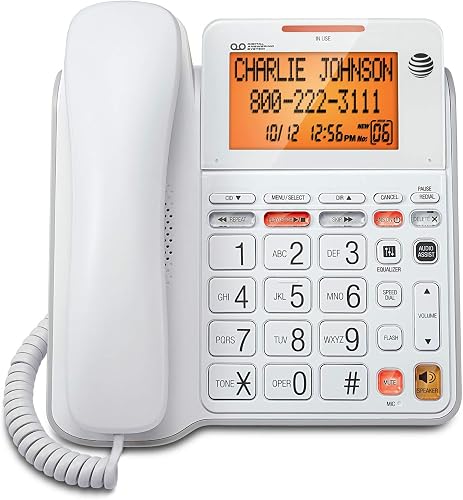
The AT&T CL4940 fits a desk, reception spot or household calling station where you can stay nearby during conversations. Its large adjustable backlit display lets you set the screen angle for that position.
The speakerphone gives you a way to talk while keeping your hands free for notes. Volume control and last-number redial also suit repeated calls from one location.
Choose it if keeping the handset in a known place matters more than walking around. The cord makes the phone's location predictable, which can help a household that often misplaces portable items.
Skip it if reaching the phone means rushing across a room or standing throughout long calls. A fixed phone should fit a comfortable seated or standing position without stretching its cords.
Which phone works during a power outage?
The AT&T supports basic line-powered calls without AC power, but only while your phone service remains available. The Panasonic needs a powered base as well as charged handsets.
The key distinction is between power for the phone and power for the service. A corded handset can't restore a connection lost because a modem, phone adapter or other network equipment has stopped working.
Ask your provider which equipment needs backup power, what any backup supports and how long it is designed to last. Don't assume an internet connection's backup arrangements also cover telephone calls.
Basic calling and extra features have different power needs. Confirm the CL4940's battery requirements with AT&T before relying on Caller ID or its answering system during an outage.
For service through an internet phone adapter, read how cordless phones work with VoIP. It explains why the service connection matters even when you keep the same household phone.
How do the answering systems compare?
The AT&T offers more recording capacity, while the Panasonic gives you message access from either the base or a handset. Choose by how you retrieve messages as well as how many you expect.
The CL4940 records up to 25 minutes for incoming messages, outgoing announcements and memos. It also supports remote access, which is useful when you need to retrieve messages away from home.
The Panasonic stores up to 17 minutes and has a Quick-Read Message Counter. Handset playback suits someone who would rather hear messages from a chair than stand beside the base.
Decide whether the phone's answering system or your provider's voicemail should take unanswered calls. If both are active, their answer settings determine which one receives the message.
Record a short greeting, then call your number from another phone to check where the message goes. Clear saved messages you no longer need so recording space remains available.
Which phone is better for nuisance calls?
The Panasonic is the better choice for built-in call blocking. Its tools address unwanted calls directly, while the AT&T's Caller ID helps you decide whether to answer.
Panasonic says Automated Call Block pre-blocks robocalls, and Telemarketing Call Block lets you block announced callers. The one-touch Call Block button lets you block 1,000 more numbers.
The Panasonic also shows a confirmation screen when you return a one-ring call. Treat an unfamiliar missed call cautiously rather than calling back simply because it appears in the history.
The CL4940 displays incoming names and numbers and keeps a 50-name-and-number call log. Reviewing that information is useful, but it doesn't replace automatic blocking.
Caller ID alone doesn't prove who is calling, and blocking tools won't catch every unwanted call. If a caller requests sensitive information, end the call and contact the organization through a number you already trust.
Our call-blocking phone guide compares other options when nuisance calls are your main reason for replacing a phone.
When is call recording useful?
Call recording can help you revisit detailed instructions, and the Panasonic supports two-way conversation recording. It announces “Start Recording” when recording begins.
Before recording, check the consent rules that apply where you and the other caller are located. For a quick appointment time or reference number, written notes may be all you need.
Where should you put the phone and chargers?
Place the phone where answering is comfortable, then check the connections and cords. A convenient location on paper may be awkward if you have to reach behind furniture to use it.
For a cordless system, the main base needs both a phone connection and power. A separate charger needs power, which gives you more freedom to place a handset near a regular seat.
Start with an open base location and check calls from the rooms where you'll use the handsets. Walls, distance and nearby equipment can affect a cordless connection, so judge coverage by your actual layout.
For the AT&T, leave enough space to lift and replace the handset without knocking other items. Keep the handset cord clear of drawers, hot surfaces and paths where someone could catch it.
Both phones offer wall mounting. Choose a height that lets the intended user read the controls and replace the handset without stretching.
Avoid putting cords across walkways or squeezing them under furniture. Our guide to connecting a cordless phone to a phone jack covers the basic connection process.
How should you set up a new home phone?
Connect the service first, then set up messages and calling preferences. This makes it easier to separate a connection problem from a menu setting.
- Identify the active connection. Use the phone jack or your provider's designated telephone port, following its instructions.
- Connect the phone line and required power. On the cordless system, install the rechargeable batteries as directed and allow the initial charge.
- Make an outgoing call and receive an incoming call. Check that the phone rings where you need to hear it.
- Set the date, time, greeting and answer delay. Check whether provider voicemail answers before the phone's answering system.
- Save useful contacts or speed-dial numbers. Add them carefully and confirm each number before relying on it.
- Explain the routine to everyone who uses the phone. Show where messages appear and where each handset belongs.
Keep the manual somewhere easy to find rather than leaving it behind the base. If you later change phone service, revisit the connection and message settings before assuming everything still works the same way.
What care does each type need?
Cordless phones need a charging routine; corded phones need clear cords and a reachable base. Both benefit from occasional cleaning and a check of the connections.
Return cordless handsets to convenient chargers when they're not in use. If several people share them, agree where each handset belongs so one room doesn't collect every phone.
Use only the replacement battery type specified for the handset. If a charged handset starts running down much sooner than before, our guide to replacing cordless phone batteries explains what to check.
Keep charging contacts clean according to the manual, and avoid spraying cleaner into openings. Unplug equipment as directed before cleaning it.
For a corded phone, check for a tangled handset cord and loose plugs. Leave enough slack for normal use without letting extra cable hang where it can be pulled.
Check saved messages regularly on either system. A full answering system can matter more in daily use than having extra recording capacity that never gets cleared.
What mistakes should you avoid before buying?
Don't choose by phone type alone. The service connection, intended user and calling location can rule out an otherwise suitable model.
Buying a corded phone solely for outages is a common mistake when the home's service depends on powered equipment. Check the whole connection before treating the phone as a backup.
Another mistake is choosing more handsets without deciding where to put them. Count useful answering locations, then make sure each location has a sensible charging spot.
Don't assume a bigger display solves every access problem. The intended user must also be able to lift the handset, hear the call and find the buttons they need.
Avoid stretching a corded handset across a room to make a poor location work. Move the calling station or choose cordless if the person needs to answer from a different seat.
Finally, don't make the phone more complicated than its user needs. Set up a few useful features first, then add others when they solve a real problem.
Which should you choose for your home?
For the cordless phone vs corded phone decision, choose the Panasonic when calls need to follow you between rooms or nuisance-call controls are a priority. Choose the AT&T CL4940 when you want a fixed calling station and don't want a portable handset to charge.
In a small home, either can work well. The deciding factor is whether your preferred seat, paperwork and phone connection come together in one comfortable place.
A mixed setup can also make sense if your service supports it: keep a corded phone at a desk and cordless handsets near other regular seats. Confirm connection limits before adding equipment.
Before ordering, name the exact place where you'll answer your next call. Then use the easy-to-use phone guide to compare options around the controls and daily habits that matter most to you.
Frequently asked questions
Is a cordless phone better than a corded phone?
A cordless phone is better for moving between rooms or keeping handsets near different seating areas. A corded phone suits someone who makes calls from one desk and wants to avoid handset charging.
Choose by your daily routine, then compare call blocking, message controls and power needs.
Will a corded phone work during a power outage?
Some corded phones, including the AT&T CL4940, support basic calls without AC power if the phone service remains available. A modem, router or phone adapter may still need electricity.
Check your provider's backup arrangements, and don't assume message features will work just because the handset can make calls.
Does a cordless phone need power?
A cordless phone needs a powered base and charged handset batteries. The handset sends calls through the base, so a full battery alone won't keep it working when the base loses power.
Place chargers where returning the handsets is easy, and follow the initial charging instructions before regular use.
Can you use both a cordless and corded phone at home?
You can use both when your phone service and wiring support the connection. Keep a corded phone at a desk and cordless handsets near other calling spots.
Check your provider's connection instructions and equipment limits before adding phones, especially when service comes through a modem or phone adapter.
Which type of phone is easier for seniors to use?
The easier phone is the one the person can reach, read and operate comfortably. A cordless handset can stay beside a favorite chair, but it needs charging.
A corded phone stays in a known place.
Consider grip, screen angle, keypad visibility and access to message controls before choosing.


