Can You Use a Cordless Phone for VoIP?
Yes, you can use a cordless phone for VoIP when its base connects to a compatible telephone port on your gateway or adapter. The Ooma Telo bundle offers another route with 3 compatible HD3 handsets.
On this page (8 sections)
- How does a cordless phone for VoIP connect?
- Can you use a cordless phone with Xfinity Voice?
- Which of these phone systems should you choose?
- How do you set up the base and handsets?
- What setup mistakes should you avoid?
- Why is there no dial tone, or why does a handset disconnect?
- How should you manage voicemail, batteries, and outages?
- Which cordless phone for VoIP fits your home?
Yes, you can use a cordless phone for VoIP if its base connects to a compatible telephone port on your provider's gateway or adapter. A service-specific package, such as Ooma Telo with HD3 handsets, is another option.
Start with your service connection before choosing handset features. An ordinary cordless set won't turn an internet connection into phone service by itself.
How does a cordless phone for VoIP connect?
A standard cordless system connects through a telephone cable between its main base and compatible VoIP equipment. The gateway or adapter handles internet calling, while the base maintains the wireless connection to your handsets.
The telephone socket may be labeled Phone or Tel, but follow your provider's instructions for the exact port. A spare Ethernet socket isn't a substitute.
What should you check before buying a cordless phone for VoIP?
Confirm that your provider supports an analog cordless phone base, and ask whether your existing equipment includes the required telephone port. If it doesn't, ask which adapter or replacement gateway the service supports.
An analog telephone adapter, often called an ATA, converts between a standard phone connection and VoIP service. Buying an adapter without checking provider support can leave you with equipment you can't activate.
If you're still choosing a service, our guide to landline vs VoIP home phone service explains the connection differences. Once compatibility is settled, compare everyday features in our best cordless phones for home guide.
Can you use a cordless phone with Xfinity Voice?
A cordless phone can work with Xfinity Voice when your voice-enabled gateway supports the base through its designated telephone port. Having Xfinity internet alone doesn't mean phone service is active.
Find the instructions for your gateway model through Xfinity's support center. Check service activation and port selection before changing phone settings.
Connect only the main cordless base to the gateway. Place extra handset chargers near convenient power outlets, such as beside a bed or desk.
Which of these phone systems should you choose?
Choose Ooma for an Ooma service package, AT&T for easier reading and call screening, or Panasonic for call recording and room to add handsets. The AT&T and Panasonic sets need a supported telephone connection from your VoIP equipment.
Ooma Telo: for households choosing a service and handsets together
The Ooma bundle suits a household starting an Ooma-based home phone setup across several rooms. It combines the Telo device with 3 compatible HD3 handsets, charging cradles, power adapters, and batteries.
Telo connects to high-speed internet, and the handsets offer picture caller ID. The package makes sense when you want matching service equipment and phones rather than choosing a separate cordless base.
Ooma includes voicemail, caller ID, and call waiting. Applicable monthly taxes and fees still apply, and features such as advanced blacklisting and voicemail-to-email forwarding belong to optional Premier service.
Skip this bundle if you're keeping another provider and only need replacement handsets. Check Ooma's service terms and number-transfer options before committing to the switch.
Link-to-cell serves a different purpose: it lets a compatible home phone handle cellular calls. Our guide to cordless phones that link to a cell phone explains that choice.
AT&T BL102-2: for readable controls and call screening
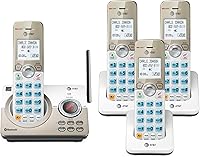
The AT&T BL102-2 suits someone who wants large controls and help screening calls on a provider-supported telephone port. Its 2-inch screen, large text, lighted keypad, and Audio Assist make those features the main reasons to choose it.
The package has 2 handsets and expands to 5 with compatible BL102-0 accessories. That suits a household starting with phones in 2 rooms but expecting to add more later.
Its digital answering machine holds up to 22 minutes of messages, announcements, and memos. Smart Call Blocker, a 1,000-entry block directory, and caller ID announce provide several ways to manage incoming calls.
Choose Panasonic instead if recording conversations is your main need. Skip buying either standard phone set until your provider confirms the gateway connection.
For more screening choices, compare our call-blocking cordless phones. Ask your provider about caller ID support so you know which caller information will reach the phone.
Panasonic: for conversation recording and a growing household
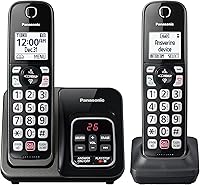
The Panasonic KX-TGD832M suits a household that wants conversation recording and space to expand. It starts with 2 handsets and supports up to 6 compatible handsets.
Two-way recording lets you replay a conversation, with an audible announcement when recording starts. Get any required consent before recording a call.
Its call controls include automated blocking, a one-ring scam alert, and a button for blocking up to 1,000 additional numbers. The answering machine stores up to 17 minutes of messages, while large illuminated keypad characters help with dialing.
Choose it for those recording and call-management tools. Skip it if you only need a basic handset and won't use the extra controls.
How do you set up the base and handsets?
Set up the service connection first, then charge and check every handset. This makes it easier to separate a phone-service problem from a handset problem.
- Activate the VoIP service and confirm that the gateway or adapter is ready.
- Connect the main base to power and the provider-approved telephone port.
- Install the correct rechargeable batteries and follow the phone's initial charging instructions.
- Register extra handsets if the phone's instructions require it.
- Make an outgoing call and receive an incoming call on a regular number.
- Check ringing, speech in both directions, caller ID, and message pickup.
For an Ooma HD3 package, follow Ooma's handset setup process. Don't assume service-specific handsets register the same way as a standard cordless base.
Our guide to connecting a cordless phone to a landline explains the base-and-cable arrangement. With VoIP, the approved gateway port takes the place of the usual wall connection.
What setup mistakes should you avoid?
Avoid mixing up service, handset, and wiring problems. Each part has a different job, so replacing the phone won't fix every failed call.
Don't connect a VoIP gateway to household wall-phone wiring without provider guidance. That wiring may still connect to an outside telephone line.
Don't buy extra handsets by brand name alone. They must match the base's supported models, and another handset doesn't create a separate phone number or calling line.
Don't mistake Bluetooth or Wi-Fi features for service compatibility. A standard analog base uses its phone cord to reach the gateway, even though you carry the handset wirelessly.
Why is there no dial tone, or why does a handset disconnect?
A missing dial tone usually calls for service, power, and cable checks first. A handset that shows a lost-base message needs a closer look at its cordless connection.
Confirm that the gateway and base have power, then reseat the telephone cable at both ends. Check the provider's service status and restart equipment only as its instructions recommend.
Move a disconnected handset close to the base and check its charge and registration. If it works nearby but fails farther away, reconsider base placement before changing VoIP settings.
Keep the base in an open spot rather than inside a cabinet. Walls, placement, and your home's layout affect cordless coverage.
Plan handset locations around where you answer calls, with help from our guide to how many handsets a cordless phone system needs. More chargers make phones easier to reach; they don't automatically extend the base's range.
How should you manage voicemail, batteries, and outages?
Choose one main message system and maintain the handsets so they're ready when calls arrive. Provider voicemail and a base answering machine can compete to answer the same call.
Set the preferred system to answer first, or turn off the one you don't want. Call your number from another phone and let it ring to confirm where messages go.
Keep charging contacts clean with a dry cloth and follow the manual's battery guidance. If runtime drops, use our cordless phone battery replacement guide to check the correct replacement type.
VoIP depends on working service equipment and internet access. A charged handset alone won't keep calls working if the gateway, cordless base, or internet connection loses power.
Ask your provider what backup arrangements cover and how emergency calling works during an outage. Keep another way to make urgent calls.
Which cordless phone for VoIP fits your home?
Choose your cordless phone for VoIP by connection first, daily use second. Keep a working cordless set if your provider supports it and its controls still suit your household.
Pick Ooma when you're choosing Ooma service and want matching handsets together. Pick AT&T for readable controls and call screening, or Panasonic for conversation recording and expansion.
Before ordering, settle compatibility, message handling, and handset locations. If the service choice is still open, use our landline vs VoIP guide to decide which connection fits your home.
Frequently asked questions
Can you use a cordless phone with VoIP?
Yes, a cordless phone can work with VoIP through a compatible telephone port on a gateway or adapter. The cordless base handles the handsets, while the gateway connects calls to your service over the internet; confirm provider support before buying, then check incoming and outgoing calls after setup.
Can I use a cordless phone with Xfinity Voice?
Yes, if your Xfinity Voice gateway supports a standard cordless phone base through its telephone port. Follow the instructions for your gateway model and active voice service; connect the main base to the designated port; extra handset chargers need power outlets, rather than separate connections to the gateway.
Can I use a regular cordless phone with Ooma?
Yes, Ooma Telo supports connecting a regular home phone, including a compatible cordless base. Follow the connection instructions for your Telo model before adding one; the bundle covered here also includes 3 Ooma HD3 handsets, so you can choose that package without buying a separate cordless phone system.
Does a cordless phone need a phone jack for VoIP?
A standard cordless base needs a telephone connection, but it can use a compatible VoIP gateway or adapter port instead of a wall phone jack. Extra handsets communicate with that base and only need charging power; avoid connecting the gateway to household phone wiring unless your provider approves the arrangement.