How to Replace a Cordless Phone Battery
Replace cordless phone batteries with the battery type, voltage, and model your handset requires, then follow its charging instructions. Match the connector or cell layout before choosing capacity or pack size.
On this page (7 sections)
- How do you find the right cordless phone batteries?
- Which replacement suits your handset and household?
- How do you replace a cordless phone battery pack?
- How do you replace individual AAA cordless phone batteries?
- How should you charge and care for replacement batteries?
- Why might a new battery not solve the problem?
- Which cordless phone batteries should you buy?
Replace cordless phone batteries with the type, voltage, and model your handset requires, then charge them according to the phone manual. Check the old battery before buying: loose rechargeable AAA cells and wired battery packs aren't interchangeable.
A battery replacement makes sense when a handset charges but runs down much sooner than it used to. If it never shows a charging signal, check the charger and contacts first.
How do you find the right cordless phone batteries?
Match the old battery code and the handset's requirements before comparing capacity or pack size. The brand name on the phone alone isn't enough.
Open the battery compartment and take a clear photo before removing anything. Record the battery code, chemistry, voltage, and handset model, which may differ from the model on the main base.
For a wired pack, compare the plug shape, wire arrangement, and space inside the compartment. A similar-looking connector or nearly matching model number doesn't confirm compatibility.
For loose cells, check the required size, rechargeable chemistry, and number of batteries. Don't assume that any rechargeable AAA cell meets the phone's requirements.
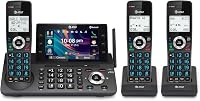
If you have an AT&T system, start with which battery an AT&T cordless phone uses. Keep the old pack until the replacement is fitted so you can compare both.
Does capacity matter when choosing cordless phone batteries?
Compatibility comes before capacity. A higher mAh figure describes more stored charge at the same voltage, but it doesn't make an unsuitable battery safe to use.
Capacity alone also can't tell you how many hours of calls you'll get. The handset, battery condition, charging routine, and use all affect run time.
Compare capacity only after the required battery type and fit match. Don't choose a different voltage or chemistry to chase longer calls.
Which replacement suits your handset and household?
Choose Panasonic cells for compatible loose-cell handsets, then compare the wired options by battery code and how many handsets need replacements. Buying extra packs only helps if those packs fit phones you actually use.
Panasonic: for compatible handsets with loose AAA cells
The Panasonic HHR-4DPA/4B set contains four genuine Panasonic rechargeable AAA Ni-MH cells, each rated at 1.2 V with capacity up to 750 mAh. It suits buyers who want Panasonic replacements for a compatible handset that takes individual cells.
If each handset requires two cells, this pack supplies two complete sets. Replace each handset's cells together rather than using one new cell beside an older one.
Skip this option if your phone uses a wired pack. A Panasonic brand name or DECT label on the handset doesn't replace an exact compatibility check.
Kruta: for two matching wired-pack handsets
Kruta supplies two 2.4 V, 800 mAh Ni-MH packs with a 5264 connector and round jack. Supported battery codes include BT162342, BT262342, BT183342, BT283342, BT166342, and BT266342.
This is a practical choice for replacing batteries in two compatible VTech or AT&T handsets. Supported examples include VTech CS6114 and CS6719, plus AT&T EL52300.
Skip it for Uniden systems or batteries such as BT1021, BT1008, BT18433, BT17333, BT183482, and 27910. Those codes aren't substitutes for the supported models.
VANBOW: for several compatible handsets
VANBOW includes four 2.4 V Ni-MH packs for supported VTech and AT&T phones. Its replacement codes include BT183342, BT283342, BT166342, BT266342, BT162342, and BT262342.
Choose this set when several matching handsets need fresh batteries. It also makes sense to replace worn packs across a household in one job, after checking every handset.
Confirm capacity before ordering: VANBOW describes this pack as 800 mAh in some specifications and 600 mAh elsewhere. Skip it if a confirmed capacity is central to your choice and that difference remains unresolved.
Cerepros: for matching VTech handsets with short calls
Cerepros supplies two 2.4 V, 300 mAh Ni-MH packs for compatible VTech phones using BT162342 or BT262342 batteries. It suits light calling when the phone's requirements match this replacement.
Its stated capacity is lower than Kruta's, so it isn't the first choice here for someone seeking more charge between long calls. Don't assume a spare pack will arrive fully charged or retain a full charge during storage.
Skip it if your handset needs a different battery code. Confirm any broader compatibility rather than assuming it covers every phone that accepts another brand's pack.
How do you replace a cordless phone battery pack?
Remove the old pack by its connector, fit the matching replacement without force, and route the wires clear of the cover. Follow any model-specific steps in the phone manual.
- Lift the handset off its charger and turn it off if possible.
- Open the cover using its latch, screw, or sliding panel.
- Photograph the old pack's position and wire route.
- Gently unplug the connector by its housing, without pulling the wires.
- Insert the replacement plug in the correct orientation.
- Seat the pack, tuck the wires into their intended space, and close the cover.
Stop if the plug won't seat or the cover won't close normally. Don't trim the plug, splice wires, or press the cover down over a tight pack.
Battery replacement and handset registration are separate jobs. If a VTech handset needs registration afterward, follow how to add an extra VTech cordless phone.
How do you replace individual AAA cordless phone batteries?
Install a complete matching set of the required rechargeable cells, following the plus and minus marks. The compartment markings matter more than how the old batteries happened to sit.
Remove all the old cells, inspect the compartment, and insert the replacements in the correct direction. If you find leakage, corrosion, or damage, stop and follow the manufacturer's service guidance.
Don't mix old and new cells, different chemistries, or different capacities in one handset. Never put disposable batteries into a handset that will charge them.
For a multi-handset system, finish one handset before opening the next. This keeps old and new cells separate and avoids leaving every phone unavailable at once.
How should you charge and care for replacement batteries?
Use the phone manual's charge period and docking routine, rather than a universal overnight rule. Check that the charging indicator appears before leaving the handset on its base.
A handset may switch on before its replacement battery has enough charge for normal calls. Wait until the required first charge is complete before judging battery life.
Keep the handset and charger in a dry spot away from direct heat. Clean charging contacts as directed, and unplug the charger before wiping accessible contacts with a dry, soft cloth.
Don't deliberately run the handset flat unless its manual calls for that procedure. For spare packs and long storage, follow the battery and phone makers' instructions.
Take removed rechargeable batteries to an appropriate battery collection point under your local rules. Keep them away from loose metal objects, and don't puncture or dismantle packs.
Why might a new battery not solve the problem?
A new battery won't repair a faulty charger, poor contact, or registration problem. Separate charging trouble from connection trouble before buying another pack.
If there's no charging indicator, check the outlet, adapter connections, and handset position. Remove and reseat the battery connection, or check cell polarity, before allowing the full charge period.
If the handset charges but loses power quickly, confirm that the replacement matches all requirements. If another identical compatible handset is available, comparing behavior on its charger can help narrow down the fault.
An out-of-range message needs a different check from a low-battery warning. Follow these steps for an AT&T phone that says out of range, or use how to pair an AT&T cordless phone to its base for registration help.
Replacing the entire system makes more sense when damaged controls, a failed base, or other faults remain. Our best cordless phones for home guide helps with that decision.
Which cordless phone batteries should you buy?
Buy the exact compatible replacement in the quantity you need. Choose Panasonic for supported loose-cell handsets, Kruta for two matching wired-pack replacements, or VANBOW for several handsets after resolving its capacity difference.
Choose Cerepros when its supported VTech battery codes and stated capacity meet your needs. For frequent long calls, compare compatible options with more stored charge before deciding.
Before ordering cordless phone batteries, save a photo of the old battery label and check every handset you're replacing. For the next setup or charging task, browse the cordless phone setup and care guides.
Frequently asked questions
How do I know which batteries my cordless phone needs?
Match the old battery's model code, chemistry, voltage, and connector or cell layout with the phone manual. Check the handset model too, since different handsets from one brand can use different batteries.
If the markings are unreadable, use the manufacturer's support information before ordering a replacement.
Can I use regular AAA batteries in a cordless phone?
Don't use disposable AAA batteries in a handset that charges its cells. Use the rechargeable chemistry and size required by the phone manual, and follow the polarity marks inside the compartment.
A wired battery pack also needs a matching replacement pack, even if it contains AAA-size cells.
Why won't my cordless phone charge after replacing the battery?
Check the battery connection or cell polarity, then confirm that the charger has power and the handset sits correctly on its contacts. Allow the full charging period required by the phone manual.
If charging still fails, inspect the contacts and power adapter before assuming another battery will help.
Do cordless phone batteries need to be charged before use?
Follow your phone manual's first-charge instructions before relying on a replacement battery for calls. A handset that powers on immediately may still need more charging before it can deliver its normal run time.
Check for the charging indicator and leave the handset seated for the required period.