Why Does My AT&T Cordless Phone Say Out of Range?
An AT&T cordless phone out of range message means the handset can't communicate with its base. Move beside the base, check its power, then check the handset's charge and registration.
On this page (8 sections)
- Why does an AT&T cordless phone say out of range?
- What should you check first?
- How can you tell if the handset needs pairing again?
- Could weak or old batteries cause the message?
- When should you move or replace the base?
- Which AT&T phone features help with a replacement?
- What if the message remains after these checks?
- How do you fix an AT&T cordless phone out of range?
An AT&T cordless phone out of range message means the handset can't communicate with its base. Bring it beside the main base, confirm the base has power, then check charging and registration.
Don't buy a new phone based on this message alone. A loose power connection, poor base location, or unregistered handset can cause the same warning, and each calls for a different fix.
Why does an AT&T cordless phone say out of range?
The warning points to a lost handset-to-base connection, rather than identifying one failed part. Distance, obstacles, lost base power, and registration problems are the first things to check.
Take the handset into the same room as the main base. If it reconnects, walk toward the room where the warning appeared and note where the link drops.
Walls, floors, metal objects, and nearby electronics can affect reception. A system that works in an open room may lose its connection across several walls or between floors.
Can an AT&T cordless phone say out of range beside its base?
Yes, if the base lacks power or the handset isn't registered to it. Being close removes distance as the likely cause, but it doesn't restore either power or registration.
Make sure you're beside the main base, not just a charging cradle. A separate charger can charge a handset without providing the radio connection it needs.
What should you check first?
Check base power before changing settings. A charged handset can remain switched on while the base is unplugged, which makes the warning easy to mistake for a handset fault.
- Bring the handset beside the main base.
- Check the base's power connection at both ends.
- Confirm the outlet works with another small device.
- Check the handset's battery connection as its manual directs.
- Charge the handset for the time stated in its manual.
- Check whether other registered handsets connect to the same base.
Use the correct power adapter for each unit. A plug that fits doesn't prove an adapter has the right electrical output, so don't swap adapters between unrelated devices.
If every handset loses its connection together, focus on the shared base and its power supply. If only one fails beside the base, focus on that handset's charge, compatibility, and registration.
A working radio connection and a working phone line are separate checks. If the warning clears but you still have no dial tone, follow our guide to connecting a cordless phone to a phone jack.
How can you tell if the handset needs pairing again?
Check registration when a charged handset won't connect beside a powered base, especially if the handset was replaced, added, or reset. A temporary range warning alone isn't a reason to erase the system's settings.
Our guide on how to pair an AT&T cordless phone to the base explains the next steps. Find the model numbers on both the handset and base before choosing instructions.
Matching brand names aren't enough to establish compatibility. Confirm that a replacement handset works with your exact base before buying it or starting registration.
Follow the model's sequence and any on-screen prompts. Avoid random long button presses or a factory reset, which may remove settings and create extra setup work.
Could weak or old batteries cause the message?
Charge the handset before judging its connection, but don't treat “Out of range” as proof that the battery has failed. Short call time, repeated shutdowns, or failure to hold a charge are more useful battery clues.
Make sure the handset sits properly in its charger and shows the charging signal described in the manual. Keep charging contacts clean with a dry, soft cloth, and avoid spraying cleaner into the cradle.
If the handset won't hold a charge, use our guide to which battery an AT&T cordless phone uses to identify a suitable replacement. For fitting and care steps, see how to replace a cordless phone battery.
The BL3107 suits someone who needs one phone within easy reach, such as beside a desk or favorite chair. Bluetooth Connect to Cell lets you handle mobile calls through the handset, and contact download saves entering those numbers manually.
Its answering system holds up to 22 minutes of messages and has a voice guide for setup. Choose it for a single calling spot; skip this package if several people need phones ready in different rooms.
Replacing the whole set makes more sense when you also want different features. If the existing phone otherwise works well and only needs a battery, start with the smaller repair.
When should you move or replace the base?
Move the base when the handset works nearby but loses its link in specific rooms. Try an open, central location within reach of the required power and telephone connections.
Avoid putting the base on the floor, behind large metal objects, or inside a closed cabinet. Change one thing at a time, then check the same walking route so you can tell whether placement helped.
If reception changed suddenly, look for a moved base, new furniture, or equipment placed beside it. Moving a charging cradle won't improve reception because the handset still communicates with the main base.
The DLP73390 suits households that manage calls and messages at the base. Its shortcuts let you keep frequently used functions close at hand, and its answering system offers up to 40 minutes of recording time.
It also supports Bluetooth Connect to Cell, call blocking, and intercom between the base and handsets. Those features suit a shared household phone, particularly when several people need access to messages and contacts.
Skip it if you mainly want a basic handset and rarely use base menus. A larger display and extra features won't resolve a poor base location by themselves.
Which AT&T phone features help with a replacement?
Choose by handset count, daily controls, and calling needs before comparing range language. More handsets create more places to keep a phone, but they don't act as signal repeaters.
DECT 6.0 describes the cordless radio technology, not a promise that every room will receive a usable signal. Our guide to what DECT 6.0 means on a cordless phone explains that distinction.
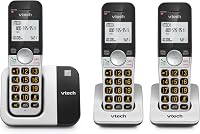
The DL72319 suits a household that wants mobile calls available in several rooms. Bluetooth Connect to Cell lets you pair up to 2 smartphones, or 1 phone and a headset, while Quiet Mode silences the ringers when needed.
Its handsets have 1.8-inch backlit screens and large, lighted keypads. The answering machine offers up to 22 minutes of recording, and the system can expand to 5 compatible handsets.
Choose it when 3 calling spots cover your routine and you may add more later. Skip it if you want 5 handsets immediately or prefer a larger handset screen.
The BL102-5 suits families that want a phone near each main living area. Caller ID announce can help you decide whether to walk over, while Audio Assist and large, lighted controls offer useful options for everyday calls.
Its handsets have 2-inch screens, and intercom supports communication within the home. Skip this bundle if you only need one calling spot, since extra chargers require outlets and extra handsets need care.
For all 4 options, check where the base can go before choosing where the handsets will live. A convenient charger location is useful only if the handset can also reach the base there.
Compare further options in our best AT&T cordless phones guide. For choices across brands, see the best cordless phones for home.
What if the message remains after these checks?
Use model-specific support if a charged, compatible handset still won't connect beside a powered base. Find the manual or troubleshooting help through AT&T telephone support.
Have the model numbers ready, along with whether one or all handsets fail. Explain whether the warning appears everywhere, only in certain rooms, or after a change such as a power interruption or handset replacement.
If another registered handset works normally beside the same base, that comparison helps narrow the fault. Avoid buying a replacement base until you've confirmed which parts are compatible and which unit needs attention.
How do you fix an AT&T cordless phone out of range?
For an AT&T cordless phone out of range, repair the connection before shopping: restore base power, charge the handset, improve placement, then check registration. Replace a battery for poor charge retention and consider a whole system when repair isn't practical or your needs have changed.
Choose the BL3107 for one calling spot, the DLP73390 for base controls and message storage, the DL72319 for mobile calls across 3 handsets, or the BL102-5 for phones in more rooms.
If your handset still won't connect beside the powered base, follow our guide to pairing an AT&T cordless handset with your exact model numbers ready.
Frequently asked questions
What does out of range mean on an AT&T cordless phone?
It means the handset can't communicate with its base, usually because of distance, lost base power, or a registration problem. Bring the handset beside the main base first; if it reconnects there, focus on base placement and the rooms where the signal drops before replacing anything.
How do I fix an AT&T cordless phone that says out of range?
Move beside the main base, confirm its power adapter is connected to a working outlet, and charge the handset as its manual directs. If the message remains, check handset compatibility and follow the registration steps for your exact model; avoid a factory reset until you've checked what it erases.
Can a cordless phone say out of range when the base has no power?
Yes, a charged handset can show the message when the main base has no power, even if a separate handset charger still works. Check the base's own adapter and outlet; use the correct adapter for that base rather than swapping in one simply because its plug fits.
Do I need to pair an AT&T handset to its base?
Yes, each compatible handset must be registered to the base before it can use that system. An added or replacement handset may need registration, but a brief loss of signal doesn't automatically mean registration is lost; check distance and base power before following the model's pairing instructions.