Best Cordless Phones for Home
The best cordless phone for most homes is the AT&T BL102-3, which combines an answering machine, automatic robocall blocking and caller announcements. Choose Panasonic for more call-screening options or Link2Cell mobile pairing, or VTech for large, spaced buttons.
On this page (11 sections)
- Which is the best cordless phone for your home?
- Which cordless phone suits each kind of household?
- What should you check about your phone service first?
- How much answering-machine capacity do you need?
- Which call-blocking controls will help your household?
- Do you need Link2Cell for mobile calls?
- Where should the base and handset chargers go?
- What makes a cordless phone easier to use?
- How should you set up a new cordless phone?
- How do you care for cordless phones and avoid common mistakes?
- How do you choose the best cordless phone without overbuying?
The best cordless phone for most homes is the AT&T BL102-3, because it brings message storage, automatic robocall blocking and caller announcements into one system. Choose Panasonic for more call-screening options or mobile pairing, or VTech if large handset buttons are your first priority.
All 4 choices include 3 handsets, but they solve different problems. A household that misses messages needs a different setup from someone who wants to answer cell calls without carrying a mobile around.
Start with the job your current phone handles poorly. Our guides to cordless phones with answering machines and call-blocking cordless phones help if either feature is your main reason to replace it.
Which is the best cordless phone for your home?
Choose the AT&T BL102-3 for a shared home line, Panasonic KX-TGD833M for nuisance-call management, Panasonic KX-TGD863W for cell phone pairing, or VTech VG232-3 for easier dialing. The right choice follows your calling habits rather than the longest feature list.
AT&T is the strongest starting point when several people share a number and need help deciding which calls to answer. Its mix of message handling and caller announcements serves that routine without making mobile pairing part of the setup.
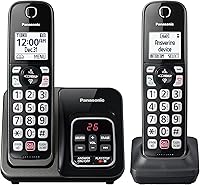
The standard Panasonic model makes more sense when interruptions drive the buying decision. The Link2Cell version serves a different need: bringing calls from a mobile phone to handsets placed around the home.
VTech puts more emphasis on the controls you touch each day. People who struggle with crowded keys should give that design as much weight as message storage or screening tools.
| Your main need | Start with | What should decide it |
|---|---|---|
| Manage a shared home line | AT&T BL102-3 | Message storage and spoken caller details |
| Reduce nuisance-call interruptions | Panasonic KX-TGD833M | Several ways to screen and block calls |
| Answer mobile calls in several rooms | Panasonic KX-TGD863W | Link2Cell Bluetooth pairing |
| Dial with larger, spaced keys | VTech VG232-3 | Handset layout and room-to-room functions |
Before choosing, decide whether you need a home number, mobile calling, or both. That one choice can rule out a system that otherwise looks suitable.
Which cordless phone suits each kind of household?
Match the phone to the person who will use it most and the task they need to do without help. LovelyLocket compared message features, call controls, handset design and connection options to make these recommendations.
The scores below stay with each product, but the closest fit matters more than a small score gap. A mobile-first household has a clear reason to choose Link2Cell even though AT&T scores higher overall.
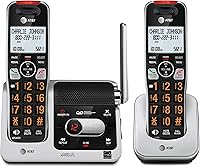
AT&T BL102-3: best cordless phone for shared home lines
The AT&T BL102-3 suits a household that wants missed-call handling and caller screening in one place. It is the most balanced choice here for a conventional home phone routine.
Score: 8.7/10. Best for shared home lines.
Its message capacity includes incoming messages, outgoing announcements and memos. That gives you more room than the other picks here, though keeping old recordings still reduces the space available for new ones.
The call-block directory holds up to 1,000 name and number entries, and a dedicated handset key lets you add a number. Spoken caller names help when you can hear the phone but are not close enough to read its screen.
A 2-inch screen with high-contrast text and a large, lighted keypad support reading and dialing. The voice guide helps with setup, while Audio Assist, a full-duplex handset speakerphone and intercom cover other daily tasks.
Buy it if several people use the home line and want a clear way to handle calls and messages. Caller announcements are especially useful when you would rather decide whether to get up before reaching the handset.
Skip it if carrying mobile calls through home handsets is the reason you are shopping. The Panasonic Link2Cell model is the choice here built around that job.
For a closer look at the controls and fit, see our AT&T BL102-3 review.
Panasonic KX-TGD833M: for homes interrupted by nuisance calls
The Panasonic KX-TGD833M suits people who want several call-screening tools without adding cell phone pairing. It also gives a growing household a stated expansion path.
Score: 8.6/10. Best for nuisance-call management.
Automated Call Block pre-blocks robocalls, while Telemarketing Call Block lets you block announced callers. The dedicated block button handles up to 1,000 additional numbers, giving you a way to respond when an unwanted caller gets through.
One-Ring Scam Alert adds a confirmation screen when you return a one-ring call. Treat that pause as a reason to check the number before calling back, rather than proof that another call is safe.
Message playback works at the base or a handset, and a message counter helps you spot recordings. An illuminated keypad with large characters, speed dial and wall mounting give you several ways to fit the phone into a regular calling spot.
The system can expand to 6 handsets, which matters if you already expect to add more rooms. Buy only compatible extra handsets, since a shared brand name does not make every handset interchangeable.
Buy it if unwanted calls are your main complaint or you expect to grow beyond the included set. Skip it if you specifically want your mobile calls on these handsets.
Both Panasonic picks also offer two-way conversation recording. Ask everyone on the call before using it, and use recordings as a reference for details such as appointment instructions.
Our guide to blocking calls on a Panasonic cordless phone explains how to approach the call controls.
Panasonic KX-TGD863W: for people who leave their mobile in one spot
The Panasonic KX-TGD863W suits a mobile-first household that wants home handsets. Its main advantage is answering a cell call from a convenient room instead of retrieving the mobile.
Score: 8.2/10. Best for mobile-first households.
You can leave a cell phone where its mobile signal is better and use a handset elsewhere. The phone still needs a working mobile connection and a Bluetooth link to the base, so placement must support both.
This model includes an 18-minute answering system plus automated and telemarketing call-block controls. A one-touch button can block up to 1,000 additional numbers, and One-Ring Scam Alert adds a callback confirmation screen.
Bilingual talking Caller ID announces calls in English or Spanish. An illuminated keypad with large characters and speed dial help with routine calls, while wall mounting offers another base placement option.
Buy it if your mobile tends to stay on a desk, counter or charging spot while you move between rooms. It also suits a household that wants to handle calls from 2 paired mobiles through one cordless system.
Skip it if you only want a straightforward home line and will not use Bluetooth pairing. The standard Panasonic model gives you a clearer reason to buy around screening and expansion.
Our Link2Cell guide explains the connection choices to check before ordering.
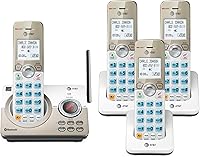
VTech VG232-3: for people who want easier dialing
The VTech VG232-3 suits people who put large, spaced buttons and accessible message playback ahead of advanced screening. Its room-to-room features also suit a family that passes calls between people.
Score: 8.2/10. Best for easier everyday dialing.
The handset screens show caller name, number, date and time, and the system stores the last 50 caller ID entries. Handset message playback saves a trip to the base, while live screening lets you pick up during a message.
Intercom connects handsets inside the home, and call transfer lets you hand an incoming call to someone in another room. A base finder makes the handsets beep when one goes missing.
Quiet mode silences the base and handsets together. The system also includes a full-duplex speakerphone, hearing-aid compatibility and pre-registered handsets.
VTech gives talk time as up to 7 hours per handset. That makes returning a handset to its charger a useful habit if someone spends long stretches on calls.
Buy it if dialing comfort and moving calls between rooms matter most. Skip it if automatic robocall screening or mobile pairing is the main feature you need, since those are stronger reasons to choose the other models.
For more choices centered on access and ease of use, read our cordless landline phone guide for seniors.
What should you check about your phone service first?
Check where the phone line comes from before comparing handsets. A traditional wall jack, a provider's phone port and a paired mobile are different ways to carry calls.
For a conventional home connection, the main base connects to an active telephone line. Extra handset chargers usually need electrical power but do not each need their own phone jack.
If your service comes through an internet provider, locate the designated telephone port on its equipment. Ask the provider about phone compatibility and outage behavior before changing your current arrangement.
Do not assume an Ethernet port is a telephone socket because the plugs look similar. Follow the labels on the equipment and use the connection intended for telephone service.
A cordless handset does not create phone service
The wireless part is the link between the handset and its base. A cordless system does not supply a phone number, mobile plan or internet phone service by itself.
These 4 systems are single-line models. Several handsets let more people reach the same system, but they do not create separate home numbers or independent outside lines.
If you need 2 people to make separate outside calls at the same time, confirm the required service and phone arrangement before buying. More handsets alone will not solve that need.
Caller ID depends on the service connection
Check that your service supports caller ID if screen details or spoken caller names matter to you. A handset cannot display a name that the service does not deliver.
Incoming names and numbers also do not prove who is calling. For sensitive requests, hang up and call the organization using a number you already trust.
How much answering-machine capacity do you need?
Choose capacity around how often you clear messages, not just the largest minute count. Someone who saves long messages or checks the phone infrequently has more reason to favor AT&T's extra space.
The capacities appear in the product boxes above, but minutes are only part of the decision. Convenient playback matters just as much if walking to the base makes you put off checking messages.
A local answering machine stores messages on the phone system. Provider voicemail is a separate service, and having both active can cause one to answer before the other.
Set one clear route for missed calls
Decide whether the home machine or provider voicemail should answer first. Adjust the ring settings so callers reach the service you intend them to use.
If the provider answers sooner, your new phone's machine may remain empty even when people leave messages. That is a setup issue to resolve before relying on the phone for important callbacks.
Clear recordings before storage becomes a problem
Delete messages you no longer need and move important details into a calendar or notes. Keeping a machine full of old recordings defeats the reason for choosing more capacity.
Record a short greeting that tells callers they reached the right household without giving away your schedule. Then call your home number from another phone and confirm that a message can be left and played back.
Which call-blocking controls will help your household?
Choose automatic screening for fewer interruptions and a manual block button for repeat unwanted callers. A long block directory alone is less useful if you still have to answer every new nuisance call.
AT&T and the Panasonic picks combine automatic controls with manual blocking. Their approaches differ, so choose the system whose settings someone in your household will be comfortable managing.
Blocking individual numbers helps with repeated calls from the same number. It has limits when callers change numbers or disguise the number shown on your screen.
Make expected callers easy to reach
Save important contacts and review any allowed-caller settings described in the phone manual. This is useful for family, schools, care providers and other people whose calls you need.
Some organizations call from several numbers or use automated announcements. After enabling screening, check missed calls and messages so you can spot a setting that needs adjustment.
Begin with a mode you understand, then change it if unwanted calls remain a problem. Turning on every restrictive option at once makes it harder to work out why a wanted call did not ring.
For a closer comparison of screening approaches, see our call-blocking phone guide.
Do you need Link2Cell for mobile calls?
Choose Link2Cell when your cell phone carries calls you want to answer around the house. It is less useful if everyone keeps a mobile within reach and prefers answering it directly.
A common use is leaving the mobile near a window or another spot with better reception. A cordless handset can then be your calling device in the room where you spend time.
That arrangement does not improve the cellular network itself. If the mobile cannot connect to its carrier, pairing it with a home phone will not create a working call.
Plan for the mobile leaving the house
Mobile calls through the cordless system depend on the paired phone staying connected. When someone takes that phone out, the handsets cannot keep handling calls through its mobile service.
In a shared home, make clear which mobile number each person should answer. A paired phone can bring personal calls into rooms where other household members are present.
Check message handling during setup
Do not assume a mobile call will use the home answering machine just because it rings a cordless handset. Mobile voicemail and the home system can behave differently, so check both call routes.
Call each paired mobile from another phone, let it go unanswered and confirm where the message arrives. Read how Panasonic Link2Cell works if you need help deciding how it fits your routine.
Where should the base and handset chargers go?
Place the base where it can serve the house, then put chargers where you naturally answer calls. A convenient charger does not extend the base's radio coverage.
All the picks include enough handsets for 3 regular calling spots. That might mean a living area, bedroom and office, rather than simply one handset on each floor.
Choose places with a nearby power outlet, a stable surface and a clear path to the phone. Avoid cords across walkways and counters where water or cooking spills can reach the charger.
Give the main base a useful position
An open position often works better than a closed cabinet, a floor-level corner or a spot behind large metal objects. Walls, floors and the home's layout affect the handset connection.
If the telephone connection forces the base toward one end of the home, check calls in the farthest rooms before settling every charger into place. A range claim cannot account for your building.
Walk to the places where you expect to talk, including a desk, favorite chair or upstairs room. Listen for dropouts and move the base if a small placement change improves the connection.
Count calling spots before buying extra handsets
More handsets help when they reduce a real walk to the phone. They also add chargers, batteries and places where someone can leave a handset off its cradle.
If you need more than the included set, confirm the exact compatible accessory model and total system limit. Do not buy a visually similar handset and expect it to register.
What makes a cordless phone easier to use?
The easiest phone is one whose keys, screen and sound suit its main user. Large print helps with reading, while key spacing, speakerphone controls and familiar menus affect the whole call.
For someone who finds small keys difficult, compare the distance between buttons as well as their size. A large button is less helpful if nearby keys are easy to press by mistake.
Think through the full task: picking up, answering, changing volume, ending the call and returning the handset to its charger. One awkward step can matter more than several extra menu features.
Separate hearing needs from reading needs
Hearing-aid compatibility and an audio-assist feature describe different things. Neither tells you by itself whether a particular person will hear every call comfortably.
AT&T and VTech include hearing-aid compatibility, while AT&T also has Audio Assist. Consider how the person usually listens, including an earpiece or speakerphone, and keep the volume controls easy to find.
Keep common tasks simple
Program frequent contacts and speed dial where available, then show the main user how to answer and end a call. Teach message playback separately rather than explaining every menu in one sitting.
Caller announcements may help someone who cannot quickly reach a display. A quieter setup may suit another household better, so choose features around the person rather than assuming everyone wants the same aids.
How should you set up a new cordless phone?
Connect the base correctly, charge the handsets as directed, and check basic calls before changing advanced settings. This order makes connection problems easier to find.
Keep the manual and model number somewhere accessible. The model number matters later when you need an extra handset, a replacement battery or help with a specific menu.
- Identify the service connection. Find the active wall jack or designated phone port before unplugging the old system.
- Connect base power and the telephone cord. Follow the manual's port labels and secure any loose cable.
- Fit the correct batteries. Follow polarity marks and attach a battery connector only as directed.
- Complete the initial charge. Use the manual's first-charge instructions rather than assuming a lit screen means a full battery.
- Check outgoing and incoming calls. Confirm the intended phone number rings the system and that both callers can hear each other.
- Set messages and screening. Record the greeting, review ring settings and check that expected callers can reach you.
For the physical connection steps, use our guide to connecting a cordless phone to a phone jack.
Once basic calls work, add contacts and adjust ring volume. If someone else uses the phone most, have that person make a call and retrieve a message before finishing setup.
Keep important contacts available outside the handset too. A short paper list is useful if the phone is discharged or someone cannot find the right menu.
How do you care for cordless phones and avoid common mistakes?
Keep handsets charged, contacts clean and replacement batteries matched to the model. These habits address common problems without changing a phone that otherwise meets your needs.
Wipe the handset and base with a soft cloth, following the manual's cleaning advice. Do not spray liquid into the keypad, speaker openings or charging cradle.
Check charging before blaming the battery
A handset resting crookedly in its cradle may not charge. Confirm that the charger has power, the contacts are clean and the phone shows its charging indicator.
If runtime has dropped, use a compatible replacement with the correct chemistry, size and connector. Our guide to replacing a cordless phone battery explains the checks to make.
Do not treat a charger as a range extender
A handset can be fully charged and still struggle to connect to its base. Move it nearer the main base to separate a coverage problem from a power problem.
Likewise, a second handset in a distant room does not relay the first handset's calls. Plan placement around the base connection rather than the nearest charging cradle.
Make quiet mode a deliberate choice
Silencing the phone is useful during rest or work, but it can also hide calls you expected to hear. Make sure everyone knows how to restore the ring.
If the phone stops ringing, check quiet mode, ringer volume and screening settings before assuming the service has failed. Those checks are especially useful after another household member changes a setting.
Plan separately for a power outage
A charged cordless handset does not guarantee calls during an outage, because the base generally needs power. Internet-based phone service may also depend on powered network equipment.
Ask your provider what remains available without electricity and plan a separate way to make urgent calls. Do not choose a cordless set on battery runtime alone if outage use is a priority.
How do you choose the best cordless phone without overbuying?
Choose the best cordless phone by solving your main calling problem first. Before ordering, identify the connection it will use, the rooms that need handsets and the feature the main user needs most.
Pick AT&T BL102-3 when a shared home line needs message space and spoken caller details. Pick Panasonic KX-TGD833M when nuisance-call controls and room to add compatible handsets drive the decision.
Choose Panasonic KX-TGD863W when you want mobile calls to follow you through home handsets. Choose VTech VG232-3 when large, spaced keys and practical room-to-room functions matter most.
If you are choosing for someone else, check how that person answers, dials and retrieves messages before placing the order. Our cordless phones for seniors guide can help turn those daily tasks into a clearer choice.
Frequently asked questions
What is the best cordless phone for home?
The best cordless phone for most homes is the AT&T BL102-3, thanks to its mix of message storage, automatic robocall blocking and caller announcements. Choose Panasonic if detailed call controls or mobile pairing matter more, or VTech if large, spaced handset buttons are your main need.
Do cordless phones need a landline?
A cordless phone needs an active phone service connection for landline calls, but a cell-linking system can also carry calls through a paired mobile phone. The Panasonic Link2Cell model here supports that use; ordinary cordless handsets do not gain mobile calling simply because they work without a handset cord.
How many handsets should a home cordless phone have?
Choose enough handsets for the places where you regularly answer calls, rather than buying one for every room. Three can serve a living area, bedroom and office; each charger needs power, and every handset still needs a usable connection to the main base wherever you place it.
Can a cordless phone block robocalls?
Some cordless phones can automatically screen robocalls and let you block individual numbers; AT&T BL102-3 and both Panasonic models here offer those controls. Blocking cannot confirm a caller's identity or stop every unwanted call, so keep personal information private and check screening settings if expected calls stop reaching you.
What does Link2Cell do on a cordless phone?
Link2Cell connects a compatible Panasonic cordless system to a cell phone using Bluetooth, so you can handle mobile calls through home handsets. It suits people who leave their mobile in one place; the mobile phone must stay connected to the system and have service for those calls to work.