How Does Link to Cell Work on a Cordless Phone?
Panasonic Link2Cell connects your cell phone to a cordless phone system through Bluetooth, so you can make and receive mobile calls on home handsets. Choose a system by handset count and call controls, then keep your cell phone where both cellular reception and the Bluetooth connection hold.
On this page (10 sections)
- How does Panasonic Link2Cell work?
- Does Link2Cell need a landline?
- Which Panasonic Link2Cell system fits your home?
- How do you pair a cell phone with Link2Cell?
- Where should you leave the cell phone?
- How do call blocking and recording help?
- What should you check about messages and daily use?
- What can stop Link2Cell from working?
- Is Link2Cell the same as using a cordless phone with VoIP?
- Which Panasonic Link2Cell setup should you choose?
Panasonic Link2Cell lets you make and receive cell phone calls through cordless home handsets by pairing your mobile with the base over Bluetooth. It suits households that want phones in several rooms while keeping a cell phone in a spot with good reception.
The main buying choices are how many rooms need handsets and which call controls you'll use. A larger set adds places to answer, but it doesn't improve the cell phone's signal.
How does Panasonic Link2Cell work?
Your cell phone carries the mobile call, and Link2Cell passes the audio between that phone and the cordless system. The base then connects to the home handset you're using.
Think of the connection as 2 links: mobile network to cell phone, then cell phone to cordless base. Walking around with a handset doesn't require carrying your mobile, but the mobile must remain connected to the base.
All 3 systems here pair with up to 2 cell phones. That gives a household a way to connect 2 mobiles, although pairing capacity isn't a promise of simultaneous calls through every handset.
Does Link2Cell need a landline?
A landline isn't required for mobile calls through Link2Cell. Those calls use the paired cell phone's service, so buying the cordless system doesn't replace your mobile plan.
The systems here include a telephone line cord and support single-line home phone operation. If you keep both services, learn how to select the cellular connection or home line before making calls.
Our guide to landline vs VoIP home phone service explains those service choices. For a home phone connection, follow how to connect a cordless phone to a phone jack.
Which Panasonic Link2Cell system fits your home?
Choose by handset placement first, then by call controls. Count the places where you regularly answer calls rather than buying a handset for every room.
A kitchen, bedroom, and home office may cover your routine with 3 handsets. A household spread across more rooms or floors may use 5, provided each charging location has a suitable power outlet.
Extra handsets don't guarantee coverage through thick walls or across a large property. Our guide to how many cordless handsets you need helps you plan placement before choosing a set.
Panasonic Link2Cell for a straightforward 3-room setup
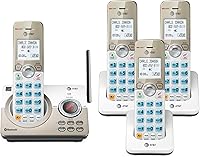
The KX-TGD863W fits households that need 3 answering points and want speed dial plus an illuminated keypad with large characters. Bilingual Talking Caller ID announces callers in English or Spanish.
It includes an answering machine, 2-way conversation recording, and a Call Block Button with room for 1,000 additional numbers. One-Ring Scam Alert adds a confirmation screen when returning a one-ring call.
Choose it if those controls cover your daily needs and you prefer its white finish. Skip it if you already know you need 5 handsets or want the larger blocking capacity of the other systems below.
A 5-handset setup for more answering points
The KX-TGF975B suits households that will use phones in 5 locations. It also has a dual keypad layout, a built-in speakerphone, and a 3,000-entry phonebook.
Its call-blocking tools include 14,000 pre-installed blocked numbers and space for 2,000 more. An answering machine, conversation recording, intercom, and baby monitor functions add options beyond placing mobile calls.
Choose it for a household with several regular answering spots, such as bedrooms, a kitchen, and an office. Skip it if spare handsets would sit unused, since each one adds another charger and battery to maintain.
A 3-handset setup with more call controls
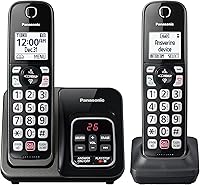
The KX-TGF973B fits buyers who want broader blocking tools without 5 handsets. Its black-and-silver design includes a dual keypad layout and displays on both the base and handsets.
It also includes an answering machine, 2-way recording, bilingual Talking Caller ID, and a full duplex speakerphone. Intercom and baby monitor functions may be useful if you'll use the set for communication within the home.
Choose it when call screening and base controls matter more than extra answering locations. Skip it if your main need is simply getting a phone into more rooms.
For more detail, see our Panasonic Link2Cell cordless phone review. To compare other brands, read cordless phones that connect to a cell phone.
How do you pair a cell phone with Link2Cell?
Use the pairing sequence in your exact model's manual, with the mobile and cordless base close together. Menu names and button sequences can differ, so don't copy steps from a different Panasonic model.
- Connect the base and chargers to power, install the included rechargeable batteries, and complete the initial charge as instructed.
- Turn on Bluetooth on the cell phone.
- Start the base's cell phone pairing process and follow the prompts on both devices.
- Confirm that the intended mobile is connected.
- Place an outgoing mobile call and have someone call your mobile number while you answer through a handset.
Pair a second mobile separately if needed, then learn how to choose the intended phone for outgoing calls. If you also use a home line, practice selecting that connection so calls go through the service you expect.
Where should you leave the cell phone?
Leave the mobile where cellular reception and Bluetooth contact with the base both hold. A window with better reception won't help if it's too far from the cordless base.
Start with a location where the mobile can make a clear call by itself. Then check a handset call from your usual rooms, including places separated from the base by walls or floors.
Keep a suitable charging cable nearby if the phone will stay there for long periods. When you take the mobile out of the house, its Link2Cell connection is no longer available to people using the home handsets.
Avoid treating any advertised cordless coverage as the Bluetooth distance available between the mobile and base. Those are different connections, and your home's layout affects where each device works.
How do call blocking and recording help?
Call blocking helps screen unwanted callers, while recording lets you replay conversation details. Neither feature replaces judgment about unfamiliar calls or requests for personal information.
Check the manual for which blocking settings apply to cellular calls and which apply to a connected home line. Don't assume a blocked-number list will stop every nuisance caller, especially when callers change or disguise their numbers.
For setup help, see how to block calls on a Panasonic cordless phone. Start with settings you understand, then check that expected callers can still reach you.
The recording feature announces “Start Recording,” so don't treat it as a private note-taking tool. Before recording, tell everyone on the call and obtain any consent required where they are.
What should you check about messages and daily use?
Check mobile voicemail and the home answering machine separately during setup. An included answering machine doesn't mean every unanswered cellular call will leave a message there.
Call your mobile number and, if connected, your home number without answering. Find where each message goes and show other household members how to retrieve it.
Save a few key contacts or speed-dial numbers before filling the phonebook. Practice answering, ending, and placing a call with the person who will use the system most.
For care, wipe the phones with a soft, dry cloth and keep charging contacts clean. Use the rechargeable battery type specified in the manual, and investigate a steady drop in talk time before replacing the whole system.
What can stop Link2Cell from working?
Check the mobile connection, Bluetooth link, and cordless handset in that order. This separates a service problem from a pairing or handset problem.
First, make a call directly on the mobile from its usual resting spot. If that fails, moving cordless handsets around won't solve the cellular connection.
Next, confirm the base has power, Bluetooth is enabled, and the intended cell phone is connected. Bring the mobile closer to the base before deleting pairings or changing several settings at once.
If only 1 handset fails, check its charge and registration to the base. Our guide to pairing an AT&T cordless phone to its base explains that separate registration issue, but use Panasonic's instructions for the actual steps.
Don't assume charged handsets keep the full system working during a power outage. Check your model's power requirements and backup instructions before relying on it for essential calls.
Is Link2Cell the same as using a cordless phone with VoIP?
Link2Cell uses a paired mobile, while VoIP carries calls through internet service. Choose based on the service you want to use at home.
Link2Cell is useful when your mobile number is already your main contact number. A VoIP setup suits a household that wants compatible cordless handsets connected to an internet-based home phone service.
Read whether a cordless phone works with VoIP, Xfinity Voice, or Ooma before choosing equipment for that connection.
Which Panasonic Link2Cell setup should you choose?
Choose the KX-TGD863W for a 3-room setup with large keypad characters, the KX-TGF975B when you'll use 5 answering points, or the KX-TGF973B for more blocking capacity in a 3-handset set.
Skip Panasonic Link2Cell if your goal is to create cellular reception where none exists. Before ordering, identify a place for the mobile and base, then count the charging spots your household will use.
If connecting your mobile isn't essential, compare the broader choices in our best cordless phones for home guide.
Frequently asked questions
What does Link2Cell do on a Panasonic phone?
Panasonic Link2Cell sends mobile calls between your cell phone and a compatible cordless phone system over Bluetooth. You can answer or place those calls through a home handset while your cell stays in one spot; the cell phone supplies the mobile connection, and the cordless base needs power.
Does Panasonic Link2Cell need a landline?
You don't need a landline for calls carried through the paired cell phone; those calls use your mobile service, so keep that service active and follow the model's mobile-only setup instructions. If you also connect home phone service, learn which controls select cellular calls and which select the home line.
How many cell phones can Panasonic Link2Cell pair?
Each Panasonic system covered here can pair with up to 2 cell phones through Bluetooth; that limit is separate from the number of cordless handsets included in the box. Pairing 2 mobiles doesn't mean every handset gets an independent line or that all call combinations work at once.
Can I use Link2Cell if my cell phone has no signal?
Link2Cell doesn't create or strengthen cellular reception; for a cellular call, your mobile still needs a usable network connection where you leave it. Find a location with good reception that also maintains Bluetooth contact with the cordless base, then check calls from the rooms where you'll use the handsets.