Landline Phone vs VoIP: What Works with a Cordless Set (November 2026)
For landline phone vs VoIP, both can support a cordless set: choose the service first, then match the phone equipment. A traditional landline works without home Internet; VoIP needs a working Internet connection and compatible equipment.
On this page (9 sections)
- Landline phone vs VoIP: which works with a cordless set?
- Which cordless system fits your household?
- Can you keep your existing cordless phone with VoIP?
- What should you compare before switching service?
- What happens if the power or Internet goes out?
- How do you set up either system without extra work?
- How many handsets do you need, and how should you care for them?
- Which common mistakes should you avoid?
- Landline phone vs VoIP: what should you choose?
For landline phone vs VoIP, choose the service first: a traditional landline works without home Internet, while VoIP carries calls through your Internet connection. Either can work with a cordless set when the phone equipment matches the connection.
The phone you hold doesn't tell you which service you have. A familiar cordless base may connect to a traditional telephone line or to a phone port on an Internet-connected adapter.
Keep a working setup if it already meets your needs. Consider switching when you want different service features, need new equipment or can reduce your total ongoing costs after fees.
 Best for growing households
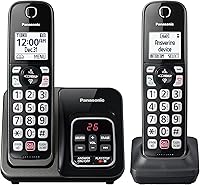
Panasonic 2-handset cordless phone with answering machine
Landline phone vs VoIP: which works with a cordless set?
Both can work with cordless phones, but the connection behind the base differs. A traditional setup uses an active telephone line; VoIP uses an Internet-connected service device, sometimes with a phone port for a regular cordless base.
There are 2 separate connections to understand. The handset talks to its base inside your home, and the service carries the call beyond your home.
Changing service may leave that first connection unchanged. You may be able to move the existing base's telephone cord from a wall jack to a compatible VoIP adapter.
A dedicated VoIP handset system takes a different route. Its handsets must match the service device, so a familiar brand name or similar-looking charging cradle isn't enough to confirm compatibility.
Landline vs VoIP: what does your phone jack tell you?
A phone jack doesn't prove you have traditional landline service. A provider can feed phone service from Internet equipment into household telephone wiring, making the wall connection look familiar.
Trace the base's telephone cord if you can. A connection to a modem, gateway or separate Internet phone device is a reason to ask the provider how calls are delivered.
Also separate cordless from cellular. A cordless handset normally communicates with its home base; it doesn't become a mobile phone you can carry away from the house.
Which cordless system fits your household?
Choose the phone around the rooms and controls you need, then confirm its service connection. The Panasonic and AT&T are standard cordless phone systems; the Ooma bundle combines a VoIP service device with matching handsets.
For a wider view of handset layouts and everyday features, compare our best cordless phones for home. Here, the useful distinction is between keeping a phone connection and choosing an Internet phone service.
Panasonic: for a household that may need more phones later
The Panasonic suits a home that wants room to expand without starting with a larger set. Its standard landline network compatibility makes it a straightforward candidate for an existing traditional phone line.
The digital answering system stores up to 17 minutes of messages. An illuminated, large-character keypad and speed dial help when you want to reach a familiar number without searching through menus.
Its call controls include automated robocall blocking, a one-touch block button and a confirmation screen when returning a one-ring call. Those tools suit a household that wants screening at the phone itself.
Skip it if you need separate telephone lines for different people or businesses, because this is a single-line system. If you're moving to VoIP, confirm the adapter connection before choosing it for that service.
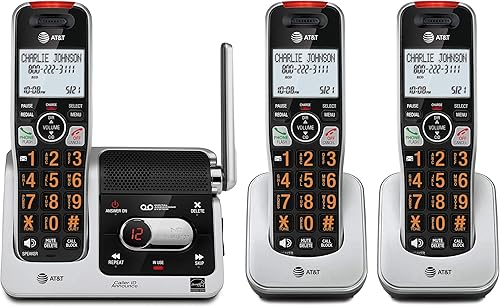
AT&T: for accessible controls across several rooms
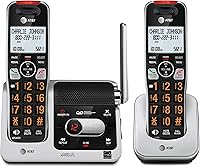
The AT&T BL102-3 suits someone who wants easier-to-read controls and caller announcements. Its 2-inch screen, large lighted keypad and Audio Assist are more useful buying reasons than choosing by handset count alone.
The answering machine holds up to 22 minutes of messages, announcements and memos. A voice guide helps with setup, while the handset intercom lets people speak between rooms without placing an outside call.
Its smart call blocker can screen robocalls, and the block directory holds up to 1,000 entries. Caller announcements help you decide whether to reach for the phone.
Skip it if you want a complete Internet phone service package, because this is the cordless equipment rather than that service. Also remember that phones in different rooms still share a single line.
Ooma: for a planned move to Internet calling
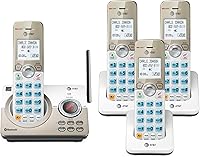
The Ooma bundle suits a household ready to choose Ooma as its phone service. It puts the service device and matching handsets together, reducing the need to match a separate cordless system.
The package includes charging cradles, power adapters and an Ethernet cable. Nationwide calling carries applicable monthly taxes and fees, so don't treat the service as having no ongoing cost.
Keeping your current number involves a one-time fee. Advanced features, including additional call-blocking options and voicemail-to-email forwarding, are part of optional Ooma Premier service.
Skip this route if your Internet connection frequently drops or you want to avoid relying on home network equipment for calls. Keeping a satisfactory service may also make more sense than replacing it just to obtain new handsets.
Can you keep your existing cordless phone with VoIP?
Often, you can keep the cordless base if the VoIP device has a compatible analog phone port. Confirm this before buying replacement phones, since changing service doesn't always require a new handset system.
Give the provider your cordless phone's exact model number. Ask whether caller ID, call waiting and any other features you depend on work through its adapter.
Keep the base and its registered handsets together unless the instructions say otherwise. Moving the base's telephone connection is different from pairing its handsets directly to a new device.
For more connection detail, see our guide to cordless phones for VoIP, Xfinity Voice and Ooma. Use it to resolve compatibility before you commit to a service change.
Don't feed a VoIP adapter into household phone wiring without confirming that the wiring is isolated from any outside telephone service. Connecting the base directly to the designated phone port avoids that wiring project.
What should you compare before switching service?
Compare the full service arrangement, including fees, number transfer, message handling and any connected devices. A new phone won't solve a service mismatch, and an attractive calling plan may lack something your household uses.
Start with your current bill and the proposed service terms. Include recurring taxes, equipment charges, optional features and any transfer or cancellation charges that apply.
If you want to keep your number, check transfer eligibility before canceling the old account. Keep the old service active until the transfer is complete and incoming calls reach the new setup.
Ask how service voicemail interacts with the phone's answering machine. If voicemail answers first, callers may never reach the recorder in your home.
Choose which system should take messages, then set its answer timing accordingly. Make sure everyone knows where to check messages so calls don't sit unheard in a second mailbox.
Check separately if your phone line supports an alarm, medical alert device or fax machine. Approval for voice calls doesn't confirm that those devices will work, so ask both the device company and the phone provider.
What happens if the power or Internet goes out?
Cordless phones generally need power at the base, and VoIP adds powered Internet equipment to the call path. A charged handset cannot keep an unpowered base, router or service device running.
Some traditional landlines can carry calls during a household outage when used with a suitable corded phone. That depends on the service, so confirm it rather than relying on the presence of a wall jack.
A battery backup helps only the equipment connected to it. For VoIP, ask which devices need backup, how long the backup lasts and whether the provider's connection can remain available.
Backup power also can't repair an Internet service outage. Keep another calling option if losing the home phone would leave you unable to reach family or emergency services.
Before switching, confirm emergency calling arrangements and the address registered for the service. Follow the provider's instructions if you move the equipment to another address.
How do you set up either system without extra work?
Set up the service connection first, then the phones and message settings. Keeping those tasks in order makes it easier to find a problem without changing several things at once.
For a traditional line, confirm the jack is active before arranging chargers around the house. Connect the base's telephone cord and power adapter, then install and charge handset batteries according to the instructions.
For VoIP, activate the account and connect the service device to the Internet as directed. Connect a compatible cordless base to its phone port, or register dedicated handsets using the system's pairing steps.
Our guide explains how to connect a cordless phone to a phone jack. With a VoIP device, identify the designated phone port instead of choosing a socket by appearance.
Place the base in an open spot where practical, away from a floor-level corner or metal cabinet. A handset charger provides a place to recharge; it doesn't automatically extend the base's signal.
Make an outgoing call and have someone call you back. Check ringing, caller ID, message pickup and conversations from the rooms where you'll actually use the handsets.
For VoIP, check call quality while the household uses the Internet normally. Broken speech or dropouts are reasons to check the network connection before replacing a handset.
How many handsets do you need, and how should you care for them?
Count convenient answering locations rather than household members. A phone near a bedroom and another near the main living area may be more useful than several chargers clustered together.
Add a handset where reaching the phone is difficult, such as another floor or a home office. Our guide to how many cordless handsets you need helps turn the room layout into a sensible buying choice.
Follow the charging instructions and use the specified replacement battery type. When talk time becomes much shorter, a worn battery is worth checking before replacing the whole system.
Keep charging contacts clean and dry, and make sure the handset sits correctly in its cradle. Wipe the phone with a soft cloth without letting moisture enter openings.
Review stored messages and blocked numbers from time to time. If an expected call doesn't arrive, check screening settings as well as service status before assuming the phone has failed.
Which common mistakes should you avoid?
Avoid buying by handset count or the word “landline” alone. The service connection, power needs and controls decide whether the phone fits your home.
Don't assume a multi-handset package gives each person a separate outside line. The Panasonic and AT&T systems here use a shared single line, even though several rooms can have phones.
Don't buy extra handsets just because they share a brand with the base. Match the supported handset model and registration method before ordering.
Don't pay for overlapping features without deciding which you'll use. A phone's call blocker, provider screening and optional service plan may handle unwanted calls differently.
Allow for callers you want to reach you, including unfamiliar numbers from schools or appointment offices. Learn the screening controls before enabling the strictest settings.
Finally, keep mobile linking separate from the service decision. Cordless phones that link to a cell phone offer another way to handle mobile calls at home, but that feature alone doesn't choose landline or VoIP service for you.
Landline phone vs VoIP: what should you choose?
For landline phone vs VoIP, keep a satisfactory traditional line if you value calls that don't depend on home Internet. Choose VoIP when your Internet connection is dependable and its service terms, features and outage plan fit your household.
Pick the Panasonic when future handset expansion matters most. Choose the AT&T when readable controls and caller announcements are the stronger daily benefit.
Choose the Ooma bundle when you've decided on Ooma service and want matching handsets with the service device. Confirm number transfer, ongoing fees and emergency address details before changing the old account.
If outage planning or staying near a base remains the deciding issue, compare cordless and corded home phones. Then use our cordless phone connection guide to plan the physical setup.
Frequently asked questions
Can a cordless phone work with VoIP?
Yes, a cordless phone can work with VoIP when its base connects to a compatible phone port on the service device or adapter; some systems also support dedicated handsets. Confirm the connection with your provider, and don't assume that handsets from different brands can pair with the same base.
Does a landline cordless phone need Internet?
A cordless phone using traditional landline service does not need home Internet for calls; the same style of phone connected through a VoIP adapter does. Look at where the base's telephone cord ends, then ask your provider to confirm how calls reach your home and what happens during an outage.
Can I use my existing cordless phone with Ooma?
Ooma Telo supports a regular home phone, so keeping an existing cordless base may be an option. Confirm its connection before switching, and connect the base as Ooma directs; this bundle also includes matching HD3 handsets; an unrelated cordless handset should not be assumed to pair directly with the Telo.
Will a cordless phone work during a power outage?
A cordless phone generally needs power at its base, even when the handset battery is charged; VoIP also needs powered Internet equipment and a working connection. Ask your provider about backup coverage and duration, and keep another way to call if the home phone becomes unavailable during an outage.
Which is easier to set up, landline or VoIP?
An active, compatible phone jack usually makes a standard cordless set simpler to install; VoIP adds service activation and an Internet-connected device, but a matched bundle reduces handset compatibility decisions. If you're moving an existing number, arrange the transfer before canceling the old service and confirm incoming calls afterward.