Panasonic Link2Cell Cordless Phone Review: Worth It? (November 2026)
Panasonic Link2Cell on the KX-TGD863W suits households that want mobile calls on 3 cordless handsets, with an answering machine and call blocking. Choose the AT&T DL72419 for another handset, or the Panasonic KX-TGF973B for more call-blocking controls.
On this page (9 sections)
- Panasonic Link2Cell review: who should buy the KX-TGD863W?
- What does Link2Cell change about mobile calling at home?
- How should you set up Panasonic Link2Cell?
- How useful are the KX-TGD863W's call-blocking tools?
- When is the AT&T DL72419 the better choice?
- Who should choose the Panasonic KX-TGF973B?
- What should you check before ordering a cell-linked phone?
- What care and use habits prevent common problems?
- Which Panasonic Link2Cell system should you choose?
Panasonic Link2Cell on the KX-TGD863W is a good fit if you want to answer mobile calls from home phone handsets while your cell phone stays in one place. It suits people who prefer a separate handset for longer conversations or want a shared place to answer calls.
Choose it around your daily routine: where calls arrive, where you sit to talk and who needs a handset nearby. The alternatives below make sense when an extra handset or stronger call-blocking controls matter more.
Panasonic Link2Cell review: who should buy the KX-TGD863W?
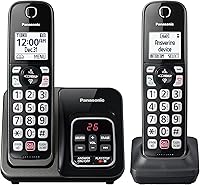
The KX-TGD863W suits households with 3 regular calling spots that want mobile pairing alongside an answering machine. Its illuminated keypad with large characters, speed dial and English or Spanish Talking Caller ID support everyday use.
Panasonic 3-handset cordless phone with Link2Cell: Best for everyday mobile calls

- Link2Cell Bluetooth for up to 2 cell phones
- 3 cordless handsets
- 18-minute digital answering system
- Bilingual Talking Caller ID
Choose the KX-TGD863W to answer mobile calls from regular spots around the home. Its illuminated keypad, speed dial and spoken caller announcements suit a shared household phone.
Pros
- Pairs with up to 2 cell phones
- Automated and telemarketing call blocking
- Illuminated keypad with large characters
- Talking Caller ID in English or Spanish
Cons
- One fewer included handset than the AT&T option
- Less message storage than the AT&T option
Put one handset near your usual seat, another near the kitchen and another by the bed, for example. That arrangement is useful when you often miss calls because your cell phone is charging in another room.
The appeal is access rather than a reason to replace a phone that already works well for you. Skip this set if you keep your mobile phone nearby, prefer its screen and rarely use a home handset.
It also makes less sense if several people need phones in separate rooms at the same time. Count the places you actually answer calls before choosing a system based on brand alone.
Our related AT&T cordless phone review covers a different model from the AT&T alternative below, so keep the model numbers separate. For a wider range of choices, compare our cordless phones that link to a cell phone.
What does Link2Cell change about mobile calling at home?
Link2Cell lets you use a cordless handset for calls carried by your cell phone. It connects the base system to the mobile phone through Bluetooth, so the mobile phone remains part of the call.
Both Panasonic models here pair with up to 2 cell phones. That suits a couple who want access to either mobile number through the home system, though pairing capacity should not be read as a promise of simultaneous calls.
There are two connections to think about: the mobile phone's cellular reception and its Bluetooth connection to the base. Moving the cell phone to a better reception spot helps only if it can still communicate with the base.
Link2Cell does not strengthen a cellular signal or create service where none exists. Start with a location where the mobile phone already handles calls well, then check whether the base can connect from its planned position.
Our guide to how Link2Cell works on a cordless phone explains the connection in more detail. If mobile pairing is optional for you, our best Panasonic cordless phones covers other ways to choose within the brand.
How should you set up Panasonic Link2Cell?
Charge the handsets, pair one cell phone and check a complete call before adding the second phone. Working through one connection at a time makes it easier to spot a placement or settings problem.
Follow the model's instructions for charging and entering Bluetooth pairing mode. Keep the cell phone near the base during pairing, enable Bluetooth and approve any connection prompts on the phone.
Panasonic Link2Cell placement: check both connections
Choose a base location that keeps the paired phone within a dependable Bluetooth connection. Avoid hiding the base behind large metal objects or placing it in a cabinet just to clear the counter.
Once paired, make an outgoing call and receive an incoming call using a cordless handset. Walk to the places where you expect to talk, including another floor if that matters to your home.
Move the cell phone to its normal charging spot and repeat those checks. A connection that works with everything side by side may behave differently after you put the devices in separate rooms.
Make the calling routine clear for everyone
Save a few frequent numbers and show each user how to choose the intended call route. If you also connect home phone service, make sure people can tell when they are placing a mobile call or a home-line call.
Decide whose cell phone will usually stay near the base. When that person takes the phone out, other household members should know that calls through that paired mobile connection are no longer available there.
How useful are the KX-TGD863W's call-blocking tools?
The KX-TGD863W gives you several ways to reduce nuisance calls, including automated blocking, telemarketing call blocking and a button for adding unwanted numbers. Its additional one-touch block directory holds 1,000 numbers.
Use the button for recurring unwanted callers rather than answering each time to ask them to stop. Check the instructions before changing broader screening settings, especially if you expect calls from new doctors, delivery services or other unfamiliar numbers.
One-Ring Scam Alert displays a confirmation screen when you return a one-ring call. Treat that pause as a reason to check the number, rather than proof that proceeding is safe.
Call blocking also needs occasional housekeeping. If an expected caller cannot reach you, review blocked numbers and screening settings before assuming the phone connection has failed.
Both Panasonic systems include 2-way conversation recording with a spoken “Start Recording” announcement. This is separate from taking an unanswered message; ask the other person before recording a conversation.
Our guide to blocking calls on a Panasonic cordless phone explains the controls and related options.
When is the AT&T DL72419 the better choice?
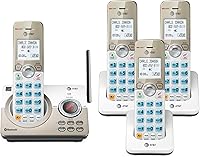
Choose the AT&T DL72419 when a fourth handset will save regular trips across the house. It also suits shared homes that will use intercom, Quiet Mode and remote message playback.
AT&T DL72419 4-handset cordless phone with smart call blocker: Best for busy shared homes
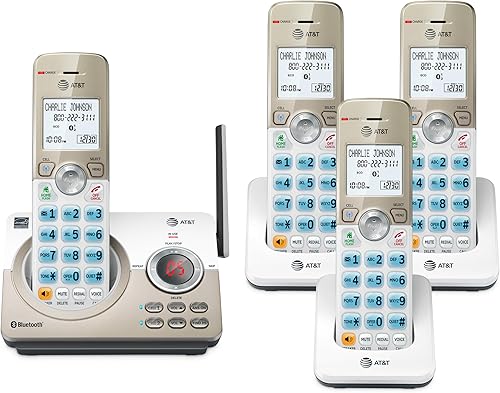
- Bluetooth Connect to Cell
- 4 cordless handsets
- 22-minute digital answering system
- Intercom and Quiet Mode
Choose the DL72419 when more people need a handset nearby. Intercom, Quiet Mode and remote message playback also suit a household with different daily schedules.
Pros
- Includes 4 handsets from one base
- Pairs with 2 smartphones or 1 phone and 1 headset
- Voice-guided answering system setup
- Intercom between handsets and base
Cons
- Extra charger needs another suitable outlet
- Extra handset may add little value in a small home
Its Bluetooth Connect to Cell supports 2 smartphones, or 1 phone and 1 headset. That second arrangement is worth considering if a Bluetooth headset is part of your usual calling routine.
The digital answering system holds 22 minutes of messages, compared with 18 minutes on the KX-TGD863W. The extra space helps when several people receive messages, but regular deletion still matters more than a small capacity difference.
Voice-guided answering setup and a lighted message display on the base help with getting started and spotting messages. Quiet Mode is useful when one person sleeps while others are awake, and the intercom lets people call between handsets or the base.
Skip this option if the fourth handset would sit unused. Another charger needs space and an outlet, so choose its location before deciding that more handsets are automatically better.
Our guide to choosing how many cordless handsets you need can help you map the system to your rooms.
Who should choose the Panasonic KX-TGF973B?
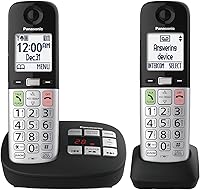
Choose the KX-TGF973B if frequent nuisance calls and controls at the base are your priorities. Its dual-keypad layout gives it a different role from a set chosen mainly for scattered handset access.
Panasonic 3-handset cordless phone with Link2Cell and call block: Best for frequent nuisance calls

- Link2Cell Bluetooth for up to 2 cell phones
- 3 cordless handsets
- 2,000 additional one-touch blocked numbers
- Dual keypad
Choose the KX-TGF973B when unwanted calls and access at the base drive your decision. It adds a larger block directory and a dual-keypad layout without adding another handset.
Pros
- 14,000 pre-installed blocked numbers
- One-touch blocking for 2,000 additional numbers
- Keypads at the base and handset
- Full duplex speakerphone and intercom
Cons
- No extra included handset over the KX-TGD863W
- Added call controls may be unnecessary for light phone use
This model includes 14,000 pre-installed blocked numbers and space for 2,000 additional numbers through one-touch blocking. The larger directory makes it the more suitable Panasonic option here if maintaining a substantial block list is part of your routine.
Its base has a 2.5-inch display, while the handset display measures 1.8 inches. A full duplex speakerphone, intercom and speed dial also suit a household that regularly uses the phone at a desk or counter.
Think about how you prefer to answer before choosing it. Base controls are useful when you spend time near the base, but add less value if you always pick up a handset elsewhere.
Skip it if you mainly want mobile pairing and receive few unwanted calls. It includes the same number of handsets as the KX-TGD863W, so it does not solve a need for another room's phone.
What should you check before ordering a cell-linked phone?
Check compatibility, call routes and daily use before comparing smaller features. A phone that matches your household's habits is more useful than one with controls nobody wants to learn.
- Your exact cell phone: Confirm support for the model and functions you plan to use, rather than assuming every Bluetooth feature works with every phone.
- Your home phone connection: If you want a separate home line, check how the base connects to your phone jack or service equipment.
- Your regular callers: Decide whether both paired mobile numbers should be available through a shared household system.
- Your handset locations: Choose places where you can reach the phone comfortably and keep its charger plugged in.
- Your message routine: Work out who will check the answering machine and mobile voicemail.
Do not assume a base answering machine will collect every unanswered call to a paired cell phone. Check the model's instructions and your mobile voicemail settings, then place an unanswered call to see where the message goes.
For help with message handling, see our cordless phones with answering machines. Focus on the controls you will use to hear, save and delete messages.
If you are choosing for an older adult, let that person assess the keypad, screen and menu steps. Our guide to cordless landline phones for seniors covers those needs beyond handset count.
What care and use habits prevent common problems?
Keep charging contacts clean, messages under control and the paired phone in a consistent spot. These simple habits make it easier to tell a connection problem from a missed setting.
Wipe the phone with a soft, dry cloth and keep liquids away from the base and chargers. Follow the manual for cleaning contacts, and avoid spraying cleaner directly onto the equipment.
If a handset stops charging well, check that it sits properly in the cradle and inspect the contacts. Use the specified rechargeable battery type when replacement is needed; our cordless phone battery replacement guide explains the basic checks.
After a cell phone software change or a move to a new charging location, check incoming and outgoing calls again. If mobile calls stop reaching the handsets, check the cell phone's Bluetooth connection before changing the cordless handset setup.
Avoid these common mistakes:
- Leaving the cell phone too far from the base: Cordless handset coverage and Bluetooth coverage are separate.
- Filling the message memory: Review saved messages and delete those you no longer need.
- Blocking an unfamiliar but expected caller: Check the number before adding it to your block directory.
- Assuming cordless means independent power: Plan around the base's need for power, and keep a charged mobile phone accessible.
Which Panasonic Link2Cell system should you choose?
Choose the KX-TGD863W for a straightforward shared mobile-calling setup, especially when its keypad, speed dial and spoken caller announcements match how you use a phone. Give each handset a useful home before you buy.
Choose the AT&T DL72419 when the extra handset, Quiet Mode or remote message access will get regular use. Choose the Panasonic KX-TGF973B when its larger block directory and base controls solve a clear need.
Before settling on Panasonic Link2Cell, identify where your cell phone will stay and where you want to answer calls. Then compare our cordless phones with Bluetooth Connect to Cell if another layout would fit those locations better.
Frequently asked questions
What does Panasonic Link2Cell do?
Panasonic Link2Cell lets you make and receive mobile calls through compatible cordless handsets using Bluetooth. Both Panasonic systems here pair with up to 2 cell phones, letting you leave a mobile phone in a useful reception spot while you talk elsewhere within the system's working range.
Does Link2Cell improve a weak cell signal?
Link2Cell does not boost your cellular signal. It lets you leave the paired phone in a spot with better reception and use a cordless handset elsewhere, but that phone still needs a usable mobile connection and a working Bluetooth connection to the base for the call.
Can the Panasonic KX-TGD863W block calls?
Yes, the KX-TGD863W includes automated call blocking, telemarketing call blocking and a button for blocking 1,000 additional numbers. Its One-Ring Scam Alert adds a callback confirmation screen, but you should still avoid returning unfamiliar calls or sharing personal details just because a call gets through.
Does the Panasonic KX-TGD863W have an answering machine?
Yes, the KX-TGD863W has a digital answering system with 18 minutes of message capacity. Plan to review and delete messages regularly, and check the instructions for how your home phone service and mobile voicemail handle unanswered calls so important messages do not end up somewhere you forget to check.