AT&T DL72319 Connect to Cell Phone Review: Worth It? (November 2026)
The AT&T DL72319 fits homes that want mobile calls within reach in several rooms, with three included cordless handsets. Choose the DL72419 for a fourth handset location or the BL3107 for one main calling spot and a larger screen.
On this page (11 sections)
- What does the AT&T DL72319 include?
- How does Connect to Cell work?
- How well does it handle unwanted calls?
- What can the answering machine do?
- How should you set up the DL72319?
- How many handset locations do you really need?
- DL72319 vs. DL72419: which one fits?
- What is a good alternative with one handset?
- How do you keep the system easy to use?
- Is the AT&T DL72319 a good fit for your home?
- Related guides
The AT&T DL72319 is a good fit for homes that want cell calls available in several rooms without carrying a smartphone everywhere. Its three included handsets suit a kitchen, bedroom and living room, or another set of places where you regularly answer calls.
Buy it for convenient call access around the home, rather than simply for a long feature list. The main decision is whether you need several handset locations, one main calling spot or an extra phone for a fourth room.
What does the AT&T DL72319 include?
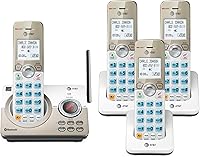
The DL72319 gives you three cordless handsets, Bluetooth Connect to Cell, call blocking and a digital answering system. The box includes the base, two separate handset chargers, three AC adapters, handset batteries and a telephone line cord.
AT&T DL72319 3-handset cordless phone with connect to cell: Best for shared family spaces

- 3 cordless handsets
- Bluetooth Connect to Cell
- 22-minute digital answering system
- Smart Call Blocker
Put a handset in three places where your household takes calls, while keeping mobile calling and home-line messages in one system. Choose it when several rooms need a phone within reach.
Pros
- Make or receive mobile calls through any handset
- Pairs with up to 2 smartphones
- AT&T says automatic robocall blocking needs no setup
- Expandable to 5 total compatible handsets
Cons
- Three charging locations need power outlets
- Cell calls depend on a paired smartphone within Bluetooth range
Each handset has a 1.8-inch backlit screen and big lighted buttons. That helps with dialing in dim rooms, though text size, contrast and menu comfort still deserve attention when choosing a phone for someone with limited vision.
The handsets share one base and one phone connection. Only the base needs the phone-line connection, but every charging location needs a suitable power outlet.
Intercom lets someone call another handset or the base without shouting between rooms. Quiet Mode silences all ringers when the household needs a break from incoming calls.
Who should choose the AT&T DL72319?
Choose the DL72319 if several people or rooms need access to the same calls. A handset near each main sitting or working area can reduce trips across the house when the phone rings.
Skip this set if nearly every call happens at one desk, or if you prefer to carry your mobile phone. Three charging spots add clutter when the extra handsets have no regular purpose.
For another AT&T model to compare, read our AT&T BL102 review. Compare the functions you actually need rather than choosing by brand name alone.
How does Connect to Cell work?
Connect to Cell lets you make and receive mobile calls through the cordless handsets using a paired smartphone. The DL72319 supports up to two smartphones, or one phone and one Bluetooth headset.
The smartphone connects to the base over Bluetooth, while the cordless handsets communicate with the base. These are separate connections, so walking farther with a handset doesn't extend the smartphone's Bluetooth connection.
Keep the paired mobile phone powered on and within Bluetooth range of the base. A regular charging spot near the base can make cell linking easier to use each day.
You can also access Siri or Google Assistant from a handset. Use that as a convenience for a compatible phone, rather than expecting the cordless screen to act like a smartphone screen.
If two people pair their phones, agree on how you'll handle each person's calls. Practice choosing the intended line before dialing, especially if personal and work numbers share the system.
Our guide to cordless phones that link to a cell phone explains what to compare across these systems. For another brand's approach, see the Panasonic Link2Cell phone review.
How well does it handle unwanted calls?
The DL72319 offers automatic robocall blocking and a dedicated key for blocking individual numbers. AT&T says Smart Call Blocker stops robocalls on the first call without setup.
Its block directory holds up to 1,000 entries. The manual block key is useful when you want to stop a particular caller, rather than relying only on automatic call handling.
Before adding a number, check that it belongs to the caller you intend to block. Teach everyone who uses the handsets what that key does, especially if someone is likely to press it while trying to end a call.
After setup, arrange an incoming call from someone whose calls matter to you and check how it reaches the phone. This helps you learn the settings before waiting for a doctor's office, delivery driver or other unfamiliar number.
If unwanted calls are your main reason for replacing a phone, compare other call-blocking cordless phones. Focus on how easily the intended user can manage blocked numbers.
What can the answering machine do?
The built-in answering system records up to 22 minutes of messages, with voice-guided setup and remote playback. A lighted display on the base shows when messages are waiting.
This suits a household that wants a visible place to check home-line messages. Put the base somewhere you pass often if that indicator is part of your daily routine.
If your phone service also has voicemail, decide which should answer first. A voicemail service that picks up sooner can leave the phone's own answering system with no message to record.
Don't assume a mobile call left unanswered through Connect to Cell will be stored on the base. Check the mobile phone's voicemail separately and confirm where each type of missed call goes.
Record a short greeting, then call your home number from another phone and leave a message. Learn playback and deletion before messages build up, and clear recordings you no longer need.
Our cordless phone answering machine guide covers other choices if message handling is the main feature you need.
How should you set up the DL72319?
Choose the base location before placing the extra chargers, then follow the included instructions for batteries, charging and Bluetooth pairing. Good placement matters more than putting every part beside the nearest available outlet.
- Connect the base to the right phone port. For traditional service, use the phone jack; for cable or VoIP service, use the provider's phone connection or compatible telephone adapter.
- Fit the batteries as directed. Follow the charging instructions before relying on the handsets for daily calls.
- Place chargers where calls happen. Use stable, dry surfaces with reachable outlets and enough room to lift each handset easily.
- Pair one mobile phone first. Make an outgoing call and receive an incoming call before adding a second phone or headset.
- Set up messages and quiet periods. Check the greeting, ring behavior and message playback with the people who will use the system.
The DL72319 works with landline, cable and VoIP services, including Ooma and Vonage. For the wired connection steps, use our guide to connecting a cordless phone to a phone jack.
For a home office, place the handset where you can reach it while seated. For a bedroom, keep the charger accessible without stretching a power cord across a walkway.
A cordless handset's battery doesn't make the whole system independent of mains power. Plan separately for outages, including any power needs of your modem or telephone adapter.
How many handset locations do you really need?
Count regular answering spots, rather than bedrooms or total rooms. A large house may need fewer handsets than a smaller home where people work and rest on different floors.
Start with the places where you spend long stretches of time. A kitchen and adjoining living area may share one handset, while a separate office may deserve its own.
The DL72319 can expand to five total handsets with compatible accessories. If you already know you need four from the start, compare the DL72419 before planning a later addition.
More handsets add convenient access points; they don't turn this single-line home phone system into several independent landlines. Keep that distinction in mind if several people need separate home-line conversations.
For help mapping out locations, read our guide to how many cordless handsets you need.
AT&T DL72319 range and placement
Base placement matters more than the maximum distance claim. AT&T advertises up to 1,000 feet of range, but walls, floors and the home's layout affect where a usable connection reaches.
Try a central, open position for the base where practical. Avoid enclosing it in a cabinet or placing it beside large metal objects.
Check calls from the rooms and corners you actually use before settling on charger locations. Adding another charger doesn't move the base or extend its radio coverage.
DL72319 vs. DL72419: which one fits?
Choose the DL72419 when four separate handset locations have a clear purpose. Its main advantage here is an extra included handset, rather than a different approach to cell linking or messages.
A bedroom, kitchen, living room and separate office give that fourth handset a useful job. It can also suit people who find it difficult to reach another room before a call stops ringing.
The DL72419 shares the key cell-linking, call-blocking and answering functions discussed above. Choose it for access across more locations, rather than expecting the added handset to improve reception by itself.
Skip the four-handset set if its extra charger would sit unused. The DL72319 is the more sensible fit when your household has three clear calling spots and no need for another.
What is a good alternative with one handset?
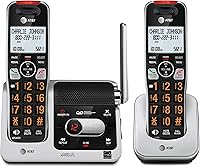
The AT&T BL3107 suits one main calling spot, especially if screen size and contact entry matter more than access from several rooms. Its 2-inch backlit screen is larger than the DL72319's display.
Bluetooth contact download lets you bring mobile contacts into the BL3107 without entering each one by hand. That can help someone with a long contact list who mainly calls from a desk or bedside table.
It also provides cell linking, Smart Call Blocker and a voice-guided answering system. Those core functions make it a reasonable alternative when you want fewer charging locations.
Skip it if another person regularly needs a phone elsewhere in the home. One included handset can become inconvenient if it keeps moving between the kitchen, bedroom and office.
A larger screen is useful, but it isn't the whole accessibility decision. Consider button visibility, grip and the number of menu steps the intended user will need each day.
How do you keep the system easy to use?
Keep charging spots consistent and simplify the daily routine. A handset that returns to the same cradle is easier to find and less likely to be left with a low battery.
Wipe the handsets and charging contacts with a soft, dry cloth, following the manual's care advice. Keep liquids away from the base and chargers, and don't spray cleaner directly onto the equipment.
Use compatible replacement batteries when needed. Check the required pack and connector before ordering, rather than assuming any rechargeable battery will fit.
Show each user how to answer, end a call, select the intended line and play a message. Add intercom and Quiet Mode once those basic tasks feel familiar.
The most common mistakes are leaving the paired smartphone out of Bluetooth range, confusing mobile voicemail with base messages, and buying more handsets to solve a base-coverage problem. Check which connection or setting is involved before changing equipment.
Is the AT&T DL72319 a good fit for your home?
Choose the AT&T DL72319 for three regular calling spots, particularly when several rooms need access to mobile calls. It offers room to expand later if your needs change.
Pick the DL72419 when you can name a useful fourth location now. Pick the BL3107 when one main spot is enough and its larger display and contact download better match the intended user.
Before ordering, identify the base's phone connection, the charging outlets and the smartphone's usual resting place. If those fit your routine, use our AT&T cordless phone guide for a final comparison.
Related guides
Choose the guide that matches your next task, from understanding cell linking to managing unwanted calls.
- How Link to Cell works on cordless phones
- Best cordless phones for home
- How to block robocalls on a home phone
Frequently asked questions
Can the AT&T DL72319 make cell phone calls?
Yes, the AT&T DL72319 makes and receives mobile calls through a smartphone paired by Bluetooth; it supports up to 2 smartphones, or 1 phone and 1 headset. Keep the mobile phone powered on and within Bluetooth range of the base; the cordless handset doesn't replace its cellular service.
How many handsets come with the AT&T DL72319?
The DL72319 includes 3 cordless handsets, a base and 2 separate handset chargers; it can expand to 5 total handsets with compatible accessories. Start by counting the places where you regularly answer calls, then check accessory compatibility before adding a handset to the system.
Does the AT&T DL72319 block robocalls?
Yes, AT&T says Smart Call Blocker stops robocalls automatically on the first call without setup; a dedicated handset key also lets you blacklist individual numbers, with room for up to 1,000 entries. Review the call-handling instructions so household members know how to block a number without blocking someone they need.
Does the AT&T DL72319 have an answering machine?
Yes, the DL72319 has a digital answering system with up to 22 minutes of recording, voice-guided setup and remote playback; a lighted base display shows waiting messages. If your phone service also includes voicemail, decide which system should answer first and adjust the ring settings to match.