How to Block Robocalls on a Home Phone
To block calls on a home phone, start with your provider's call-blocking tools, then use your handset's block list for repeat callers. Choose caller screening if you also need to receive calls from unfamiliar numbers.
On this page (8 sections)
- How do you block calls on a home phone?
- Can a phone block robocalls before they ring?
- Should you block a number or screen unknown callers?
- What should you check before buying a call-blocking phone?
- How do you set up and maintain call blocking?
- Can you block calls without buying a new phone?
- What mistakes can make home phone blocking less useful?
- Which way to block home phone calls should you choose?
To block calls on a home phone, start with your provider's call-blocking tools, then add repeat unwanted numbers to your handset's block list. Use caller screening when you need unfamiliar people to reach you without answering every call.
You may already have enough protection without replacing your phone. Buy a new system when you need features your current setup lacks, such as caller prompts, automatic robocall blocking, or a block key within easy reach.
How do you block calls on a home phone?
Check your provider's tools first, then your phone's menus. Provider filtering works through your service, while handset blocking depends on the phone connected to it.
- Sign in to your provider account or contact support and ask about call blocking, spam filtering, and screening.
- Confirm whether caller ID or another service is required and whether there is an extra charge.
- Open your phone's call history or call-block menu and find the steps for adding and removing numbers.
- Start with repeat nuisance callers, then review missed calls after enabling broader filters.
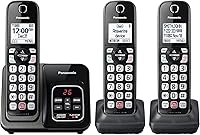
For a phone-specific walkthrough, see how to block calls on a Panasonic cordless phone. Button names and menu paths vary, even within the same brand.
How to block home phone calls from repeat numbers
Save a repeat nuisance number to the block list after checking that you selected the right call-history entry. A dedicated block key makes this easier, but everyone using the phone should know what that key does.
Number blocking works best when the caller keeps using the same number. If each unwanted call shows a different number, broader screening is more useful than filling the directory one entry at a time.
Can a phone block robocalls before they ring?
Yes, some cordless systems can filter robocalls before ringing, while others give you caller prompts and manual blocking options. Choose by how much attention you want to give incoming calls.
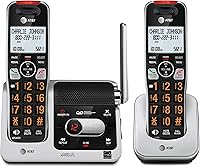
The AT&T BL102-3 offers automatic robocall blocking, a one-touch blacklist key, and space for up to 1,000 names and numbers. Its caller ID announcer helps you decide whether to answer without first reading the screen.
Choose the BL102-3 if you want phones in 3 rooms and easy access to blocking controls. Audio Assist, a 2-inch screen, and a lighted keypad also make it worth considering when reading small text or hearing callers is a concern.
Skip this set if you only need one phone location. If mobile calling through the home handsets is a priority, compare the Connect to Cell options below.
The VTech VS112-27 takes a more explicit screening approach: it can ask callers to press the pound key, or ask unknown callers to record their names and press that key. You can then answer, block, or send the call to its answering system.
This 2-handset set suits people who want to hear who is calling before answering. Its visual ringer can also help you notice calls in a noisy room.
Skip prompt-based screening if essential callers cannot complete the prompt. Automated appointment messages, for example, may not respond to a request to press a key.
Should you block a number or screen unknown callers?
Block known nuisance numbers; screen unfamiliar callers when new contacts matter. An unfamiliar visible number and a withheld number are different cases, so check how your chosen settings treat each.
If you rarely receive new calls, stricter filtering may suit you. If you arrange deliveries, medical visits, or home repairs, keep a way for callers outside your contacts to identify themselves.
The AT&T DL72419 combines automatic robocall blocking with a one-touch blacklist and a 1,000-entry directory. Its 4 handsets connect through one base and phone jack, so you can cover several phone locations without separate line connections.
Choose this set for a household that needs phones on different floors or beside several regular seats. Bluetooth Connect to Cell also lets you pair up to 2 smartphones and handle mobile calls through the handsets.
Skip the larger set if extra charging spots would add clutter without saving trips across the house. Quiet Mode silences its ringers, but silence alone does not block a caller.
For more options, compare the best call-blocking cordless phones. Focus on how each system handles calls rather than choosing by directory capacity alone.
What should you check before buying a call-blocking phone?
Match the phone to your service, room layout, and daily routine. A large block directory cannot make up for controls that the person using the phone finds confusing.
Check where the base will connect and where each charger will sit. Extension handsets need charging power, even when they do not need their own phone jack.
If connection points are unclear, follow our guide to connecting a cordless phone to a phone jack before ordering a replacement.
The AT&T BL3107 combines Smart Call Blocker, unknown-caller screening, and Bluetooth Connect to Cell in a single-handset system. It can also download mobile contacts, which saves entering those numbers one by one.
Choose it for one main phone spot, especially if you want mobile contacts available on the home handset. Its 2-inch backlit screen and lighted big buttons suit readers who prefer larger text and keys.
Skip this package if several people need a handset nearby at the same time. Count the places where calls are actually answered before deciding how many handsets to buy.
Bluetooth pairing and landline blocking serve different purposes. Do not assume a setting for incoming landline calls also filters calls arriving through a paired smartphone.
Our guide to cordless phones that link to your cell phone explains that connection. For broader choices, see the best cordless phones for home and the call-blocking guide.
How do you set up and maintain call blocking?
Begin with a modest filter, then check whether important calls still reach you. Changing several settings at once makes it harder to find the cause of a missed call.
Charge the handsets according to the manual, connect the base, and confirm you can make and receive calls before adjusting blocking. Use the voice-guided setup where available, then record a clear answering message.
All 4 systems here include digital answering systems with up to 22 minutes of recording capacity. Decide whether the phone or your provider's voicemail should answer first, then set the ring delay accordingly.
Add familiar contacts or allowed numbers if your system supports that option. Ask someone whose number is not saved to call so you can hear the screening prompt and check what happens next.
Keep a short note beside the phone explaining how to block and unblock a number. Review missed calls and messages daily during the first few days after changing filters.
Delete messages you no longer need and keep charging contacts clean according to the manual. If a handset loses power, restore normal operation before assuming the call blocker caused a missed call.
Can you block calls without buying a new phone?
Yes, provider filtering or your existing phone's block list may be enough. Start there if the current phone is comfortable to use and only a few repeat callers cause trouble.
Ask your provider what blocked callers experience and whether you can review filtered calls. Also ask how to reverse a block before enabling a broad rule.
The Federal Trade Commission's guidance on unwanted calls explains how to respond to suspicious calls and report them. Treat caller ID as a clue, since a familiar-looking number does not prove who is calling.
What mistakes can make home phone blocking less useful?
Avoid rejecting every unfamiliar caller or relying only on saved-number blocks. Those choices can either cut off useful calls or leave you chasing constantly changing numbers.
Do not confuse a quiet ringer with a blocked call. Check missed-call records and messages before deciding whether filtering is working as intended.
Avoid pressing a key offered by an unwanted recorded message to request removal. Hang up, then use your provider's controls or the phone's own block function.
If a caller claims to represent a company or government office, call back using a trusted number. The FCC's guide to unwanted calls covers blocking and reporting options.
Which way to block home phone calls should you choose?
Use provider tools first, then choose a phone around the calls you need to receive. For repeat nuisance numbers, a convenient block key may be enough; for unfamiliar callers, prioritize screening controls.
Choose the BL102-3 for automatic blocking across 3 phone locations. Pick the DL72419 when you need a fourth handset and want mobile calling through the same system.
Choose the VTech VS112-27 for caller-name prompts in a 2-handset setup. Pick the BL3107 for one main phone location with mobile contact downloads.
Before deciding how to block calls on your home phone, write down which callers must get through and where you need handsets. Use our call-blocking guide to compare the features that meet those needs.
Frequently asked questions
Can I block robocalls on a home phone?
Yes, use your provider's call-blocking service or a cordless phone with robocall blocking or caller screening. Start with tools available through your current service before replacing the phone; check how each option handles unfamiliar callers, since appointment reminders and other useful automated calls may also need to reach you.
How do I block a number on a cordless home phone?
Open the handset's call history, select the unwanted number, and choose the block option if your phone supports it; some models have a dedicated block key instead. Follow your model's instructions, then find the removal option so you can undo an accidental block without resetting the phone.
Will call blocking stop every unwanted call?
No, call blocking cannot stop every unwanted call because callers can change or disguise the number shown on caller ID. A saved-number block helps with repeat numbers, while screening adds another filter for unfamiliar callers; review missed calls and messages after changing settings to catch problems early.
Should I block unknown callers on my home phone?
Use screening rather than rejecting all unknown callers if you expect calls from doctors, repair workers, or other new contacts; a caller prompt can let a person identify themselves before you answer. Check the rules for withheld numbers separately, since those calls may be handled differently from visible unfamiliar numbers.