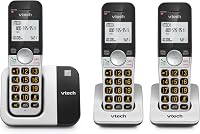
How to Add an Extra Handset to a VTech Cordless Phone
To add additional VTech cordless phones, confirm handset compatibility and your base's expansion limit, then follow its manual's registration steps. Matching the VTech brand alone isn't enough.
On this page (7 sections)
- How to add additional VTech cordless phones to your base
- How many extra VTech handsets can a base support?
- Does each handset need its own phone jack?
- What if the VTech handset won't register?
- Should you add handsets or replace the phone system?
- What mistakes should you avoid after adding a handset?
- Which route should you choose to add additional VTech cordless phones?
To add additional VTech cordless phones, match the accessory handset to your exact base model, check the system's handset limit, and follow its registration instructions. Another VTech handset won't necessarily work just because it shares the brand.
An extra handset joins your existing system; a complete phone set comes with its own base. Choose between those options before ordering, because buying another full set isn't the same as adding a handset to your current base.
How to add additional VTech cordless phones to your base
Check compatibility, charge the handset, and use your model's registration sequence. There isn't one button sequence that works for every VTech system.
Start with the model number on the main telephone base, which connects to your phone service. The number on an existing handset may identify the handset rather than the whole system.
- Find the base manual. Locate the sections covering accessory handsets, expansion limits, and registration.
- Match the accessory model. Check the full model number, including any suffix, against the supported options.
- Count registered handsets. Include an old or missing handset if you haven't removed its registration.
- Prepare the new handset. Fit its correct battery, connect its charger, and allow the initial charge required by the manual.
- Register near the base. Follow the base and handset instructions in order, including any time limits between steps.
- Confirm normal use. Look for the stated success message, then make and receive a call before moving the handset to its room.
A charging symbol only confirms charging; it doesn't confirm registration. Likewise, hearing a dial tone doesn't replace checking that the new handset rings on an incoming call.
How do you choose an additional VTech cordless handset?
Choose by confirmed base compatibility, not appearance, color, or wireless standard. A handset that looks identical or fits an old cradle can still be the wrong accessory.
Check what comes with the handset, too. You need the correct battery, charging cradle, and power adapter unless you already have compatible parts.
DECT 6.0 describes the wireless technology, not a promise that any two phones will pair. Our guide to what DECT 6.0 means on a cordless phone explains that distinction.
How many extra VTech handsets can a base support?
The total system limit includes the handsets you already use. A base that supports 5 handsets doesn't have space for 5 more when 4 are already registered.
The VTech CS6529-4B comes with 4 handsets and supports 5 in total. Its compatible expansion choices include CS6509, CS6509-14, CS6509-15, and CS6509-16 handsets.
This set suits a household that wants 4 phone locations now and a clear route to one more later. Its different handset colors also help household members keep track of which phone belongs in which room.
Skip it if you need 6 phone locations on one base. Don't buy the complete set just to obtain an extra handset for a different VTech system.
If you're choosing a system for several rooms, compare how many handsets a cordless phone system needs before buying. Count places where you regularly answer calls, rather than putting a phone in every room by default.
Does each handset need its own phone jack?
Extra handsets usually need a powered charger, not another phone jack. They communicate wirelessly with the main base, which connects to your phone service.
A charger keeps a handset's battery charged; it doesn't act as another base or extend coverage. Plan each location around both a power outlet and a usable connection to the main base.
Keep the base in an open position rather than inside a cabinet. Walls, floors, and distance can affect reception, so check calls at each planned location before fixing cables in place.
For the main connection, see how to connect a cordless phone to a phone jack. If your phone service comes through an internet device, our guide to using a cordless phone for VoIP explains the connection to check.
What if the VTech handset won't register?
Check compatibility and capacity before repeating setup. Repeating the registration sequence won't make an unsupported handset work or create space on a full base.
If the model is compatible, charge it and move it close to the powered base. Follow the instructions again, paying attention to which button belongs to the base and which belongs to the handset.
A lost handset may still occupy a registration slot. Use the manual's removal instructions carefully, since some procedures remove all handset registrations and require you to register the remaining phones again.
Avoid a full reset as your first step. If you're unsure what a procedure removes, ask VTech support before changing a working system.
Could a low battery stop registration?
A handset that shuts off during setup can't finish registering. Charge it first and make sure it stays powered while you follow the steps.
If charging fails, check the outlet, adapter connection, and how the handset sits in the cradle. Wipe charging contacts with a dry cloth and keep liquids away from the phone and charger.
A handset that works only briefly after charging may need a battery rather than replacement. Our guide to replacing a cordless phone battery explains what to check.
What if registration succeeds but calls still fail?
Separate a handset problem from a phone-service problem. If an existing handset can make calls but the new one can't, focus on the new handset's registration, charge, and location.
If every handset has the same problem, check the main base's power and phone-line connection. Record the exact screen message before contacting support so you can describe the fault clearly.
Should you add handsets or replace the phone system?
Add a compatible handset when your current base works and has space. Choose a complete set when you need more phone locations than it supports or want controls your current phones lack.
The following sets are replacement options, not confirmed accessory handsets for your existing base. The VG232 models below come with their included handsets pre-registered, so you don't need to pair those handsets individually during initial setup.
Choose the VG232-3 for 3 regular phone locations
The VTech VG232-3 suits a household that needs a phone in a living area, bedroom, and one other room. Large buttons and backlit displays make it worth considering when small keys are the reason for replacing an older set.
Skip this set if you already know you need 4 or 5 locations. Don't assume you can expand it later without first confirming supported accessories and its total capacity.
Choose the VG232-4 for a fourth busy room
The VTech VG232-4 suits homes where a fourth handset has a clear job, such as staying beside a home-office desk. It avoids moving one phone between rooms and leaving its usual spot empty.
Skip the extra handset count if only 2 or 3 rooms need phones. More handsets mean more chargers to place, and they don't increase the distance each handset can work from the base.
Choose the VG232-5 for 5 useful answering points
The VTech VG232-5 suits larger households with 5 distinct places where someone needs to answer. Its intercom and call-transfer functions help pass a call to another room without carrying the handset there.
Skip it if the real problem is poor reception in a distant room. A larger handset bundle gives you more phones, not proof of stronger coverage through your walls.
Across these VG232 sets, you get a 14-minute answering machine with message access from the handsets, a full-duplex speakerphone, and a handset finder. Choose the count by room use, then compare other options in our guide to best cordless phones for home.
If your current phone still meets your needs, how to replace a cordless phone battery may help you keep it in service.
What mistakes should you avoid after adding a handset?
Check each handset in its intended room and keep its charger easy to reach. A phone that stays discharged or sits beyond usable range won't help you answer calls.
Make an incoming and outgoing call from each location. On systems with intercom or call transfer, learn those controls before you need to pass an important call to someone else.
Remember that these are single-line systems. Adding handsets gives you more places to use the same line; it doesn't create separate outside lines for different people.
Keep a simple note of the base model, accessory model, and registered handset count. That saves another compatibility search if you later replace a missing phone.
If dialing comfort is the main concern, compare cordless landline phones for seniors. Button size, display readability, and charger placement matter more than buying the largest bundle.
Which route should you choose to add additional VTech cordless phones?
Keep your current base when one compatible accessory solves the problem. For the CS6529-4B, that means using its remaining slot rather than replacing a working set.
Choose the VG232-3, VG232-4, or VG232-5 when you want a complete replacement with the right number of included handsets. Confirm any future expansion needs before ordering, and choose locations around where people actually take calls.
For another brand, use its own model-specific instructions. See how to pair an AT&T cordless phone to its base if you're also setting up an AT&T system.
Frequently asked questions
Can you add any VTech handset to a VTech base?
No. You need a handset model that your exact VTech base supports.
Check the compatible accessory models in the base's manual before buying, and confirm any unclear model suffix with VTech support.
Sharing the same brand or DECT 6.0 label doesn't prove that two devices can register together.
How many handsets can I add to a VTech cordless phone?
Your base's total handset limit determines how many you can add. Subtract the number already registered from that limit, including any old handset still registered but no longer used.
The VTech CS6529-4B supports 5 handsets in total and comes with 4, leaving space for 1 compatible addition.
Why won't my VTech handset register?
Common causes include an incompatible handset, a full base, low battery power, or the wrong registration sequence. Charge the handset and follow the instructions for your exact base with both devices nearby.
If it still fails, give VTech support both model numbers and the exact message shown on the screen.
Does an extra cordless handset need a phone jack?
Usually, only the main base needs a phone-line connection. An extra handset registers wirelessly to that base and uses a powered charging cradle.
Plan a suitable outlet for each charger, and remember that placing a charger farther away doesn't extend the base's wireless range or increase its handset limit.