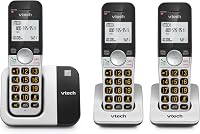
How to Hook Up a Cordless Phone
To hook up a cordless phone, place the base near both a phone jack and a wall outlet, connect the line cord to the jack, and connect the power adaptor. Then set each handset in its charger, let it charge fully, and make a test call.
On this page (9 sections)
- What do you need before you hook up a cordless phone?
- Where should you put the base and chargers?
- How do you connect the base to the phone jack?
- How do you power the base and charge the handsets?
- How do you register each handset to the base?
- Why does your cordless phone show no dial tone?
- How do you test the phone and set up the basics?
- How do you keep the phone working well after setup?
- What should you check last before you rely on the new phone?
To hook up a cordless phone, put the base within reach of both a phone jack and a power outlet, run the line cord from the base to the jack, and plug in the power adaptor. Then seat every handset in its charger and let it charge before you test a call.
The whole job takes about 15 minutes once the outlet and jack are in the right spot.
Getting this right the first time comes down to four things: where the base sits, how the cords connect, whether the handsets charge, and whether the line actually works. This guide walks through each in order, so you can hook up a cordless phone without guessing at a loose cord or a dead handset.
What do you need before you hook up a cordless phone?
Gather the base, the power adaptor, the telephone line cord, and each handset with its charger before you start. Most new systems also include a handset cover, rechargeable batteries and a wall-mounting adaptor, so unpack everything and keep the pieces together.
You also need a working phone jack and an indoor wall outlet close to where you want the base. A power strip works for the adaptor, but keep it off the floor where it could get wet.
Clear a flat surface for the base away from a sink, a microwave and a large metal cabinet. Those can interfere with the radio link between the base and the handsets.
Set aside the manual for your model, since the charge contacts and the registration steps differ slightly between brands.
Where should you put the base and chargers?
Place the base near the phone jack and an outlet, but away from damp areas and other electronics. The base holds the answering machine and the radio, so its spot decides how well the whole system performs.
Keep the base on a stable surface at about waist height. A high shelf near a window is fine if the cords reach, but avoid direct sun and heat vents.
Don't bury the base behind a sofa or inside a closed cabinet.
Put the extra handset chargers where you actually use the phone, such as a bedroom or a kitchen counter. Each charger needs its own outlet, so count your free sockets before you commit to a layout.
If you plan to mount the base on a wall, use the included wall-mounting adaptor and check that the line cord still reaches the jack.
How do you connect the base to the phone jack?
Plug one end of the telephone line cord into the base's line port and the other end into the wall jack. The line port is usually labeled LINE or TEL LINE, and it is separate from the power port.
Push each connector in until it clicks. A half-seated line cord is the most common reason a new cordless phone shows no dial tone.
If your home has more than one jack, pick the one closest to where you want the base rather than running a long cord across a walkway.
Some homes use a DSL internet service on the same line. In that case, the phone line needs a DSL filter between the jack and the base.
Without the filter you may hear hiss or the internet may drop during calls. Our walkthrough on how to connect a cordless phone to a landline covers the jack, filter and splitter choices in more detail.
How do you power the base and charge the handsets?
Plug the power adaptor into the base and a wall outlet, then set each handset in its charger. Use the adaptor that came in the box, since the plug size and voltage are matched to the base.
The base runs on mains power, so the outlet must stay on for the phone to ring and record messages. Many bases also keep a small backup, but don't count on it for everyday use.
Each handset needs to sit fully on its charge contacts. Look for the charging icon on the display to confirm contact.
Leave a new handset in the charger for its first full charge before heavy use. The Panasonic system in the box below includes 6 AAA batteries across its 3 handsets and lists up to 10 hours of talk time and 120 hours of standby once charged.
How do you register each handset to the base?
Most bundled handsets arrive already registered, so they work as soon as they charge. A spare handset you add later usually needs pairing, and the steps vary by brand.
On many systems you press and hold a button on the base for a few seconds, then follow the handset menu to register. Keep the handset close to the base during pairing.
If a handset shows "not registered" after charging, repeat the pairing steps from the manual.
Brands differ enough that it is worth checking the exact sequence for yours. Our guide on how to pair an AT&T cordless phone covers the AT&T registration steps in order.
How do you add a handset to a Panasonic base?
For a Panasonic system, start registration from the base and confirm on the handset when the display prompts you. The KX-TGD833M supports up to 6 handsets, so you can expand a 3-handset set later.
Keep the new handset within a few feet of the base while it registers. Once it shows a handset number on screen, place it in its charger and let it charge.
If the number doesn't appear, repeat the process and check that the handset's battery is seated correctly.
Why does your cordless phone show no dial tone?
Check the line cord first, then the power and the handset charge. A missing dial tone almost always comes down to one of those three.
Work through them in order:
- Confirm the line cord is clicked into both the base and the wall jack.
- Try a different jack or a different cord to rule out a bad connection.
- Check that the power adaptor is firmly in the outlet and the outlet works.
- Lift the handset and press Talk; if the display is blank, it needs more charge time.
- If you use DSL, confirm the filter is in place.
If a corded phone on the same jack gets a dial tone and the cordless does not, the problem is in the base or the handset registration. When no phone on the jack works, the line itself needs attention from your provider.
How do you test the phone and set up the basics?
Make a test call from each handset and ask the person on the other end how you sound. This confirms the line, the base link and the handset microphone in one go.
Then set the date and time, record your answering machine greeting, and store a few speed-dial numbers. On the Panasonic system, the answering machine holds up to 17 minutes of messages, while the AT&T BL102-2 records up to 22 minutes.
Both let you screen calls before you pick up.
If you want to cut down on unwanted calls from day one, turn on the call block features now. The Panasonic base pre-blocks robocalls and adds a one-touch block button, and the AT&T model blocks robocalls before the first ring and stores up to 1,000 blocked numbers.
Setting this up early saves you from blocking numbers one at a time later.
How do you keep the phone working well after setup?
Keep the base plugged in, wipe the charge contacts now and then, and replace worn batteries when talk time drops. Small habits keep a cordless phone reliable for years.
Dust on the charge contacts stops a handset from charging fully, so wipe them with a dry cloth when the display shows a low battery after a full day in the charger. Keep the base and handsets away from water and from heat sources.
When a handset starts losing charge quickly, the battery is usually the cause. Our guide to cordless phone batteries covers how to swap a pack safely.
Genuine replacements matter for fit and talk time, and the Panasonic 4-pack below is made for DECT cordless phones.
If you are still choosing a system, it helps to know what the radio standard means. Our explainer on the DECT 6.0 cordless phone standard covers range and clarity.
What should you check last before you rely on the new phone?
Run one final test from the farthest room and confirm the answering machine picks up. A cordless phone that works at the base but drops out upstairs needs a different base spot, not a new phone.
Call your own number from a cell phone and let it ring through to the machine. Listen to the greeting and leave a short message to confirm recording works.
Then play it back from a handset.
If the range is weak, move the base higher and away from the router or a large appliance. When the setup looks good, keep the manual with the base so you can find the registration and call block steps later.
For most homes, a three-handset system like the Panasonic above covers the main rooms and leaves room to add more handsets as needed.
Hooking up a cordless phone is mostly about the cords and the charge. Get the line and power right, let the handsets fill up, and test a call from more than one room before you settle in.
Frequently asked questions
How long should a new cordless phone charge before first use?
Let the handsets sit in their chargers until the display shows a full battery. Plan to leave them there for the first charge before you start making calls, since talk time suffers when a new pack is only partly charged.
Why does my cordless phone show no dial tone after I hook it up?
Check that the line cord is pushed fully into both the base and the wall jack. Then confirm the power adaptor is plugged into a working outlet and that the handset is sitting squarely in its charger, since a loose handset will not wake up to register.
Can I hook up a cordless phone without a phone jack?
Not to a landline. A cordless base needs a line connection to send and receive calls, so without a jack you would use a phone-to-cell adapter or a VoIP terminal instead of a wall jack.
The base wiring is the same once you have a dial tone source.
How many handsets can one cordless phone base support?
It depends on the model. The Panasonic KX-TGD833M system supports up to 6 handsets, while the AT&T BL102-2 supports up to 5.
Check your model's limit before buying a spare handset to add to the base.