Does Panasonic Still Make Cordless Phones?
Yes, Panasonic still makes cordless phones for home use, including systems with answering machines, call blocking, and Link2Cell. Choose by phone connection first, then handset count and ease of use.
On this page (8 sections)
- Does Panasonic still make cordless phones?
- Which Panasonic cordless phone fits your household?
- How many handsets should you choose?
- Will a Panasonic cordless phone work with your service?
- How should you set up and care for a Panasonic cordless phone?
- Which call-management mistakes should you avoid?
- How does Panasonic compare with other cordless phone brands?
- Which Panasonic cordless phone should you choose?
Yes, Panasonic still makes cordless phones for home use, including sets with answering machines, call blocking, larger controls, and Link2Cell. Choose your phone connection first, then the number of handsets and the controls your household will use.
The main choice is between a regular home phone system, a system that also handles mobile calls, and one built around easier dialing. Our guide to Panasonic cordless phones compares more options across the range.
Does Panasonic still make cordless phones?
Yes, Panasonic offers cordless home phone systems with different features and handset counts. The 4 options below cover smaller households, homes needing more calling stations, mobile phone users, and people who prefer larger buttons.
A cordless handset communicates with its base, which connects to your phone service or, on a Link2Cell model, a paired cell phone. The handset being wireless does not mean the whole system works without cables or power.
For message-focused options, see our guide to cordless phones with answering machines. Our best cordless phones for home guide covers the wider category.
Which Panasonic cordless phone fits your household?
Choose the 2-handset answering-machine set for a smaller setup, the 3-handset set for another calling station, the Link2Cell set for mobile calls, or the large-button set for easier dialing. Buy around your daily use rather than the longest feature list.
Does Panasonic still make cordless phones with answering machines?
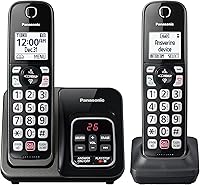
Yes, and the KX-TGD832M suits a household that wants messages and call blocking with 2 handsets. Place one near the main living area and the other where you often miss calls, such as a bedroom or home office.
Its answering system stores up to 17 minutes of messages, with playback from the base or handset. A message counter lets you check for messages without first opening a handset menu.
Large characters on an illuminated keypad help with dialing in dim rooms, while speed dial gives quick access to frequent numbers. The wall-mountable base also suits a spot where counter space is limited.
Choose this set if you want to start with fewer phones and add compatible handsets later, up to 6 total. Skip it if you need mobile call pairing or want 3 or 4 calling stations immediately.
Compare alternatives in our guide to the best cordless phones with answering machines.
Who should choose the 3-handset call-blocking set?
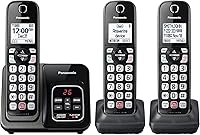
The KX-TGD833M suits homes with 3 regular calling areas, such as a kitchen, bedroom, and study. Its extra handset is the main reason to choose it over the smaller set.
Automated Call Block targets robocalls, while Telemarketing Call Block lets you block announced callers. A dedicated button lets you block an additional 1,000 numbers.
These call-blocking tools are also present on the 2-handset option above, so choose between them mainly by room coverage. The 3-handset system also expands to 6 handsets.
The One-Ring Scam Alert displays a confirmation screen when returning a one-ring call. Use that pause to decide whether you recognize the caller; a callback prompt is not proof that a number is safe.
Skip this set if 2 phones cover your routine or if mobile pairing is essential. Our guide to call-blocking cordless phones helps compare other call-management options.
When is the 4-handset Link2Cell set worth choosing?
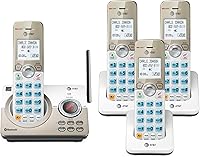
The KX-TGD864W fits households that want mobile calls on cordless handsets throughout the home. Its 4 included handsets make sense when several people or rooms need convenient access.
Link2Cell pairs with up to 2 cell phones over Bluetooth. You can leave a cell phone where reception is better and answer through a cordless handset elsewhere.
That arrangement still depends on the cell phone having usable service and staying within Bluetooth reach of the base. It does not create a mobile signal where none exists.
Bilingual Talking Caller ID announces calls in English or Spanish, and the digital answering system has 18 minutes of recording capacity. These features suit a shared household that wants call information and messages close by.
Skip it if you only use a home phone line and need few handsets. Read how Link2Cell works on a cordless phone before choosing it mainly for mobile calls.
Who benefits most from the large-display set?
The KX-TGU432B suits someone who finds small buttons, screens, or contact menus awkward. Its 2.1-inch display and big buttons make it the clearest choice here when dialing controls matter most.
The Favorites Key stores up to 3 contacts and flashes for incoming and missed calls. Set those contacts around the person's routine, such as family members they call often.
Volume Boost adds up to +12 dB, and Talking Caller ID announces calls. Start at a comfortable volume and adjust as needed rather than assuming the highest setting will suit everyone.
A built-in flashlight offers light when needed, but keep proper room lighting within reach too. This set includes 2 handsets and can expand to 6.
Skip it if Bluetooth mobile pairing is your main need. Our guide to cordless landline phones for seniors explains other useful control and alert choices.
How many handsets should you choose?
Choose one handset for each place where you regularly need to answer, rather than one for every room. Count floors, bedrooms, and work areas where carrying a phone would interrupt your routine.
Extra handsets reduce trips across the house, but each charging spot needs access to power. Decide where the chargers will go before ordering a larger bundle.
More handsets do not mean more outside phone lines. These are single-line systems, so do not choose them expecting separate home and business lines just because several phones are included.
Expansion also requires compatible handsets. Do not assume an older Panasonic handset will register to a new base simply because the brand matches.
Will a Panasonic cordless phone work with your service?
Match the base connection to your phone service before buying. The standard 2-handset answering-machine model supports standard landline networks, and the 3-handset model supports traditional landline networks.
With internet-based phone service, the telephone cord generally connects to a phone port on the provider's gateway or adapter. Confirm the correct port and service support with your provider.
Our guide to using a cordless phone with VoIP, Xfinity Voice, or Ooma explains that setup. A telephone cord does not plug into an Ethernet port.
Do not count on a cordless system during a power outage without checking the full setup. A charged handset alone does not keep the base, internet gateway, or phone adapter powered.
How should you set up and care for a Panasonic cordless phone?
Charge the handsets, confirm incoming and outgoing calls, then configure messages and call blocking. This order makes it easier to find a connection problem before adding settings that might affect calls.
Follow these steps:
- Connect the base to power and the correct phone connection, then install the included rechargeable batteries as directed.
- Charge each handset for the initial period stated in its manual.
- Place the base in an open spot, away from large metal objects and enclosed cabinets where practical.
- Make an outgoing call and call the home number from another phone.
- Record a clear greeting, set the ring delay, and check message playback.
- Add frequent contacts and show each household member how to answer, end, and block calls.
For cable placement and connection details, use our guide to connecting a cordless phone to a phone jack.
If your provider also supplies voicemail, decide which message service should answer first. A shorter provider voicemail delay can prevent the phone's own answering machine from taking messages.
Keep charging contacts clean and dry, using a soft cloth and the manual's care guidance. If runtime drops, check the charger connection and battery condition before replacing the whole system.
Use only the battery type specified for the exact model. Our guide to replacing a cordless phone battery explains how to match replacements safely.
Which call-management mistakes should you avoid?
Avoid blocking unfamiliar callers before checking who they are. Medical offices, delivery services, and other expected callers may use numbers you have not saved.
Review call-blocking settings after setup and check that important calls still reach you. Caller ID names and familiar-looking numbers are not proof of identity, so avoid sharing sensitive details based only on the display.
The first 3 sets above include two-way conversation recording. Tell the other person and confirm you have any required permission before using it; recording a conversation is separate from storing an unanswered-call message.
How does Panasonic compare with other cordless phone brands?
Compare the exact features you need across individual models. A useful comparison matches included handsets, message handling, mobile pairing, and ease of dialing.
Our guide to Panasonic vs. VTech cordless phones compares those brands.
If AT&T is also on your shortlist, see Panasonic vs. AT&T cordless phones.
Which Panasonic cordless phone should you choose?
Panasonic still makes cordless phones, and your connection and daily routine should decide the model. Choose the KX-TGD832M for a smaller message-handling setup or the KX-TGD833M when you already know you need another calling station.
Pick the KX-TGD864W when mobile calls belong on your household handsets. Choose the KX-TGU432B when larger controls and quick access to close contacts matter most.
Before ordering, confirm your service connection, charger locations, and any expansion-handset compatibility. Then use our guide to the best Panasonic cordless phones to compare the closest alternatives.
Frequently asked questions
Does Panasonic still sell cordless phones?
Yes, Panasonic offers cordless home phone systems with answering machines, call blocking, and different handset counts. Some models also include Link2Cell for handling mobile calls through cordless handsets.
Start with your phone connection and the rooms where you take calls, then choose the controls and message features you need.
Are Panasonic cordless phones being discontinued?
Panasonic still offers cordless phone systems, so the brand has not stopped making them altogether. Individual models can change, and an older handset may not work with a newer base.
If you want to expand an existing system, confirm the exact compatible handset model before ordering.
What should I look for in a Panasonic cordless phone?
Choose your connection type first, then handset count and controls. An answering machine handles missed calls, call blocking helps manage nuisance callers, and Link2Cell handles mobile calls on supported models.
For someone who struggles with small keys, a larger display and simpler access to favorite contacts may matter more.
Can Panasonic cordless phones work with cell phones?
Yes, some Panasonic cordless systems use Link2Cell to connect with cell phones over Bluetooth. The KX-TGD864W pairs with up to 2 cell phones so you can make and receive mobile calls through its handsets.
Keep the paired cell phone within Bluetooth reach of the base and where it receives a usable mobile signal.